How to track your earnings across multiple gig apps
Every app shows you its own total. Here’s how to get the one number that matters: what the whole shift paid.

No app gives you one combined earnings number. Uber shows you what Uber paid. DoorDash shows you what DoorDash paid. Run both in the same shift, and you end the night with two separate totals, and neither one tells you what the whole shift was worth.
That combined number matters: it's your real hourly pay, it shows which app deserves your time, and it's the record you'll need at tax time. The fix is a spreadsheet, a screenshot log, or a tool that pulls your earnings from every app into one place, and the right one depends on how many apps you run and how many hours you drive.
Whichever you pick, you're responsible for reconciling those numbers, not the platform. The IRS expects you to report gig income whether or not a platform ever sends you a form [1]. So here's how to make it as easy as possible.
Here’s what we’ll cover:
Why track your earnings across multiple gig apps?
Three things go missing when you aren't keeping one combined record across your apps:
Mileage you can back up. Business miles are often a driver’s biggest write-off, and each app's "online miles" figure isn't the same as a record you can defend.
Your real dollars per hour. Add up what every app paid and divide by the hours you were out, and you get a number no single app will ever show you. Skip it and you're guessing.
Which app is worth your time. Without the combined math, the app that felt busy usually wins the argument, and busy isn't the same as profitable.
Let's say it's 11:40pm on a Friday and you've had Uber and DoorDash running since 5pm. Uber's summary says $118 across nine trips. DoorDash says $64 across seven deliveries. Neither app knows you were out for six hours and 40 minutes, so neither will tell you the shift paid about $27/hr before gas, and neither counts the 14 miles you drove back across town empty.
In a peer-reviewed study out of Penn State based on 25 interviews with gig workers, several participants reported incomplete mileage or incorrect income tracking by gig platforms [2]. Drivers in the study used outside tools to track what the apps didn't, like time spent working and overall mileage. So it pays to keep your own record and check the apps' numbers against it.
Here's what a mileage record needs to show. Oregon's Department of Revenue doesn't accept total "online" miles as a deduction record at all, because driving with several apps open double-counts miles and gives no way to separate personal driving from business driving [3]. What it does accept is booked or on-trip miles straight from the app logs, plus miles between bookings if you keep a log, updated at or near the time of each trip, with the date, start point, end point, miles, and business purpose. That's one state's guidance, but it shows exactly what a record you can defend looks like.
Manual ways drivers track earnings across apps
The Penn State interviews found workers using automatic tracking apps, spreadsheets, pen and paper, and platform-native features, often in combination [2]. Mixing methods doesn’t mean you haven’t found the right tool yet. Manual tracking is a legitimate answer, and for a driver running two apps a few nights a week it's frequently the better one.
The screenshot log: Every platform gives you a weekly earnings summary. Screenshot each one the moment it posts, drop them all in a single dated album on your phone, and you have a primary-source record without typing anything. It won't add itself up, so you're still doing the math at month's end. A screenshot of the platform’s own summary is a stronger record than a number you retyped.
Pen and paper. A notebook in the door pocket, one line per shift. Drivers who use it stick with it because the friction is close to zero and there's no app to remember to open. The limitation is obvious: no automatic sums, and nothing backed up if the notebook goes missing.
The spreadsheet: One row per platform per day. Columns that earn their space: date, platform, hours online, gross pay, tips, trip miles, and total miles driven including the repositioning between offers. Seven columns, entered once when the shift wraps and the numbers are still on screen. A weekly total row at the bottom, and a monthly tab that sums the weeks. That's the whole system, and it takes about three minutes a night.
Let's say it's Sunday at 9pm and you're at the kitchen table. You open the week's screenshots, type one row per platform per day into the sheet, and the weekly total row reads $612 gross across 31 hours online. Three minutes of typing, and now you know the week paid $19.74/hr before expenses, which no single app was ever going to tell you.
All three cost a few minutes a shift at most, and each one fails in its own way once you stop doing it:
Method | Time per shift | Where it fails |
|---|---|---|
Spreadsheet | About three minutes | One skipped night becomes a gap that never gets filled |
Screenshot log | Under a minute | Nothing adds itself up until you sit down at month's end |
Pen and paper | Under a minute | No sums, and no backup if the notebook goes missing |
One habit makes all three methods work better: log where each trip started and ended.
The miles an app pays you for usually run from when you accept an offer to when you drop off. The driving between offers isn't in that number, and on a slow night it can add up to as much as the paid miles.
Those between-offer miles only count as a deduction if your log shows the date, where you started and ended, and why you drove. The drive from home to your first pickup, and back home after your last drop-off, is commuting, which tax authorities generally treat as personal.
If your log only has what the apps report, you're missing miles you could deduct. If it has every mile but doesn't say why you drove them, you can't back it up.
The trade-off across all three is the same. Manual methods cost a few minutes a day and give you total control over what gets recorded. They fail when you stop doing them, which is the failure mode that matters most.
Can an automatic tracking app do it for you?
Automatic trackers, as a category, run in the background, detect when you're driving, and log trips without you touching anything. They remove the nightly data entry, which is exactly the step drivers abandon first. Good ones let you tag a trip as business or personal after the fact and export a mileage log at tax time.
The short version: a background tracker automates the mileage log, and the earnings side stays on you unless the tool itself pulls totals across platforms.
What you need | What a background tracker does | What's still on you |
|---|---|---|
Mileage log | Records trips automatically, all day | Tagging business vs personal, if it can't tell |
Per-platform earnings | Usually nothing, it can't see inside the apps | Pulling each platform's summary yourself |
One combined total | Only if the tool aggregates across platforms | Adding up the separate totals, otherwise |
Hourly rate across the shift | Rarely, without earnings data to divide by | The math, unless earnings and time both land in one place |
The distinction that matters: mileage tracking and earnings aggregation are different problems. A tracker that logs every mile you drive still leaves you opening each app to find out what you made. Unless the tool itself pulls earnings across platforms, you've automated the easier half.
Two things worth checking before you commit to any automated tool. First, whether it can export a plain mileage log you keep yourself, because a record trapped inside a subscription you cancel stops being a record the day you stop paying. Second, how it handles the days you drive without working, since a tracker that logs every personal trip as business creates a cleanup job rather than removing one.
Where Mystro's earnings history fits
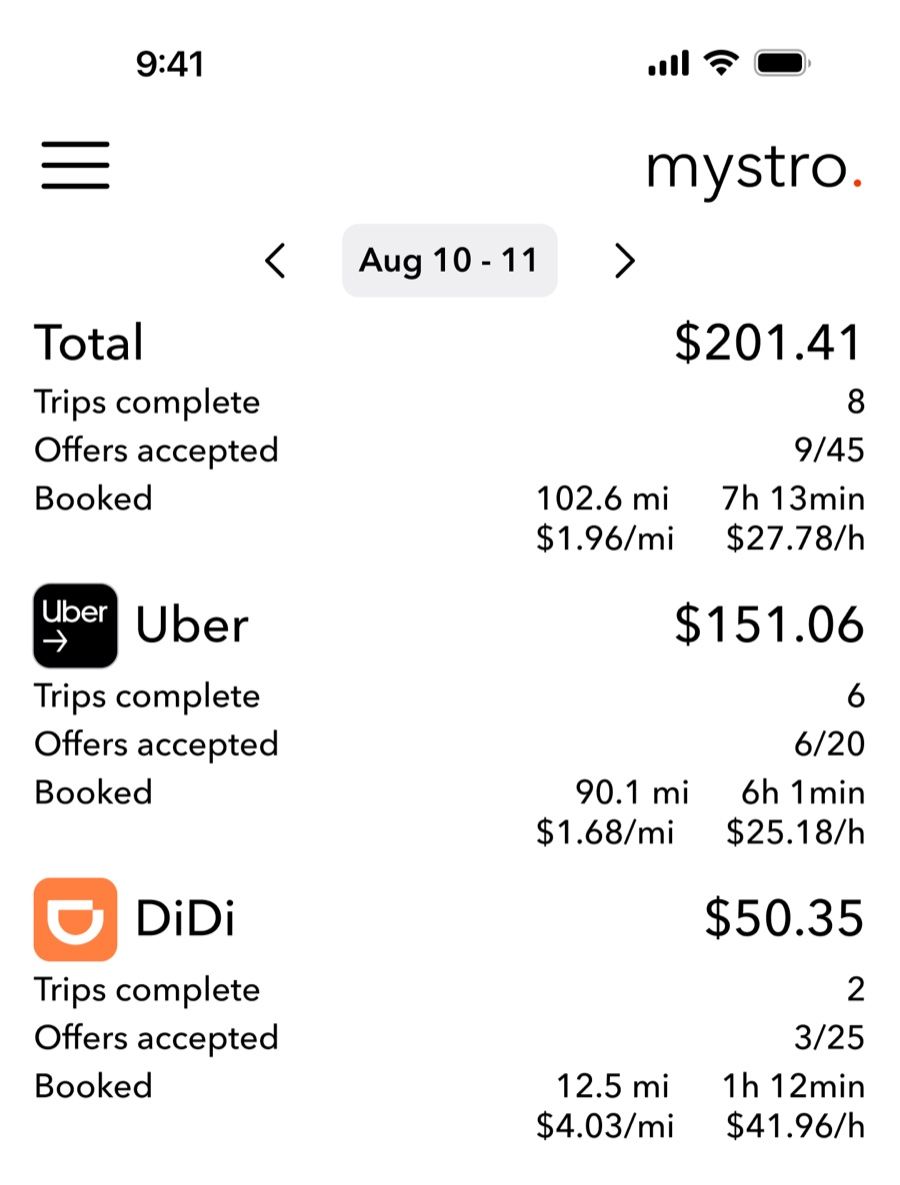
Mystro isn't a bookkeeping tool, a tax product, or anything that handles 1099 paperwork. Its job is the in-shift layer: switching between platforms and auto-rejecting offers that miss your own dollars-per-hour and dollars-per-mile minimums. Because it runs Uber, Lyft, DoorDash, Uber Eats, and DiDi in one place, your earnings history arrives combined instead of split by app, with mileage logged alongside each trip. Instacart isn't supported, so an Instacart shift stays in whichever manual log you keep.
If you want to go deeper on the per-mile math, cost per mile is its own subject and worth understanding before you judge whether a platform is paying you properly.
For a wider view of which tools belong in a multi-platform setup, Mystro's guide to managing multiple rideshare platforms covers the full stack rather than just the tracking layer.
Why tracking earnings across platforms matters for taxes
This is where fragmented records turn into a real financial problem, and it comes down to one rule many drivers half-know.
Gig income is taxable regardless of whether any platform sends you a tax form. The IRS states it directly: gig economy income must be reported whether or not you receive a Form 1099-K, 1099-MISC, 1099-NEC, W-2, or any income statement at all, including when you're paid in cash, property, goods, or virtual currency [1].
Read that against how multi-apping actually works. A driver who tracks only the platforms that issued a 1099 is under-reporting income, and the platform's decision about whether to send a form has no bearing on whether the money is taxable. The gap in your records becomes your problem, not the platform's.
The same logic runs the other way on deductions, and this is where the missing record costs real money. Miles you can't back up are miles you can't deduct. The IRS raised the standard mileage rate midyear, from 72.5 cents to 76 cents a mile for driving on or after July 1, 2026 [4]. That makes 2026 a two-rate year, so the date on each logged trip now decides what it’s worth. At 76 cents, 5,000 miles of second-half repositioning you drove but never logged is $3,800 in deductions gone.
Self-employment tax is 15.3%, and it applies to 92.35% of your net earnings [5], so that's about $540 in tax paid on income the IRS would have let you keep, before any income tax on top. Mystro's rideshare taxes guide covers the deduction categories and quarterly estimate mechanics in full, so this piece won't re-run them. The tracking point is the one that belongs here: the record has to exist before any of that applies.
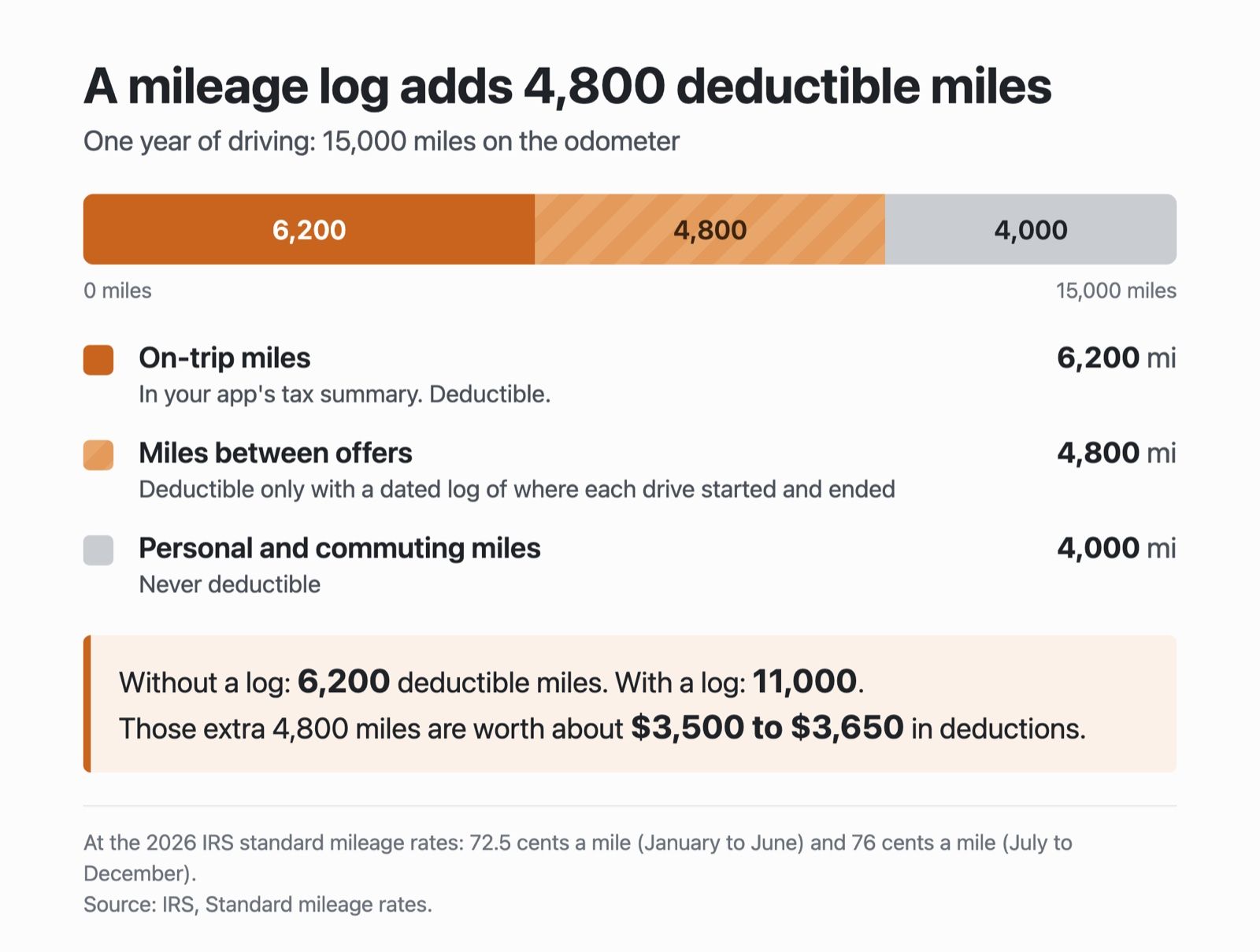
Let's say it's the second week of January and you're filling in a Schedule C. Uber's tax summary shows 6,200 on-trip miles for the year. The odometer says the car did 15,000, and about 4,000 of those were personal. The 4,800 miles in between were driving between offers, and without a dated log showing where each of those drives started and ended, they're a guess. A guess isn't a deduction. With a log, those 4,800 miles are worth about $3,500 to $3,650 in deductions at the 2026 rates of 72.5 and 76 cents a mile [4].
One regional note, since Mystro's readers aren't all in the US. The 1099 rules above are US-specific. If you're driving in Australia or elsewhere, the principle that self-employment income is reportable holds broadly, but the forms, thresholds, and deduction rules don't transfer.
Which tracking method should you use?
Comparisons of tracking methods usually ask the wrong question: which one is best. The better question is which one you'll still be running in December, because a spreadsheet you maintain beats an app you stopped opening in week three.
The short version: two apps part-time, a spreadsheet is enough; full-time or rides plus deliveries, you want a tool that adds up the totals for you; and anyone filing a Schedule C needs a mileage record either way.
The honest test for any method is whether you'd still do it after a bad shift at 1am. The honest test for any method is whether you’d still do it after a bad shift at 1am.
A reasonable way to settle it: run whichever method you're drawn to for four weeks without changing anything, then look at how many shifts are actually in the record. Four full weeks of complete entries means the method fits how you work.
Gaps on the busy nights mean the friction is too high, and the fix is a simpler system rather than more discipline. Drivers tend to blame themselves for abandoning a tracking habit when the real problem is that they picked a method built for someone with a different schedule.
If multi-apping itself is still new to you, the mechanics of running Uber and Lyft simultaneously are worth getting right first, since the tracking problem only shows up once you're running the apps together.
Frequently asked questions about tracking gig app earnings
Does Mystro track my mileage?
Yes. Mystro logs mileage alongside each trip in your combined earnings history for Uber, Lyft, DoorDash, Uber Eats, and DiDi. It isn't a bookkeeping or tax tool, so for filing you'll still want a dedicated mileage record and, for many drivers, a tax professional.
Do I have to report gig income if a platform doesn't send me a 1099?
Yes, in the US. The IRS is explicit that gig economy income is taxable whether or not you receive a 1099-K, 1099-MISC, 1099-NEC, W-2, or any income statement at all. Whether a platform issues a form has no effect on whether the income is reportable.
Can I combine mileage from two apps running at once for tax purposes?
Not by adding up each app's "online" miles. With two apps open, the same mile shows up in both, and online miles can't separate personal driving from business driving. That's why Oregon's Department of Revenue doesn't accept online miles at all [3]. What it does accept is the on-trip miles from each app's own log, plus miles between trips if you keep a log with the date, start point, end point, miles, and business purpose of each drive.
What's the simplest way to start tracking today?
Pick one method from the manual section and commit to it for a full month before you evaluate anything. A spreadsheet with seven columns, filled in after each shift, will tell you more after four weeks than any tool you install and abandon.
What's the best way to track earnings across multiple gig apps?
Cross-platform tracking comes down to consistency more than tooling. The best system is the one still running in month four, and the goal is modest: one number at the end of the week that reflects the whole shift instead of two or three separate app totals you never got around to adding.
Start with whatever you'll maintain. If you’re running Uber, Lyft, and DoorDash in the same shift, Mystro puts your earnings from all of them in one history, so the weekly number is already added up.
References
[1] Internal Revenue Service. "Gig economy tax center." IRS.gov, current. https://www.irs.gov/businesses/gig-economy-tax-center
[2] Rie Helene (Lindy) Hernandez, Qiurong Song, Yubo Kou, Xinning Gui. "'At the end of the day, I am accountable': Gig Workers' Self-Tracking for Multi-Dimensional Accountability Management." ACM CHI 2024 Proceedings, 2024. https://dl.acm.org/doi/fullHtml/10.1145/3613904.3642151
[3] Oregon Department of Revenue. "Gig Work." Oregon.gov, current. https://www.oregon.gov/dor/pages/gig-work.aspx
[4] Internal Revenue Service. "Standard mileage rates." IRS.gov, current. https://www.irs.gov/tax-professionals/standard-mileage-rates
[5] Internal Revenue Service. "Topic no. 554, Self-employment tax." IRS.gov, current. https://www.irs.gov/taxtopics/tc554
This post first appeared in The Mystro Newsletter — driver tips, earnings strategies, and Mystro updates, in your inbox every week.