How to become a DoorDash driver, step by step
See age rules, sign-up steps, background check timing, insurance, and pay all in one place.

To become a DoorDash driver, check that you meet the age, vehicle, and ID rules, sign up at dasher.doordash.com, pass the background and identity check, set up how you get paid, and start your first Dash. DoorDash calls its drivers Dashers, and the sign-up form takes a few minutes. Most of the waiting is the background check. This guide covers how to get on the road and how to tell a good offer from a bad one.
Getting approved is the easy part. Whether a Dash pays depends on the offers you take, and the offer card leaves the dollars-per-hour and dollars-per-mile math to you.
Updated October 2026: The DoorDash requirements, payout fees, and IRS mileage rates in this article are current as of October 2026.
Here's what this guide covers, so you can jump to the part you need:
What do you need to become a DoorDash driver?
Check these before you start the form, so you don’t hit a wall halfway through. Here’s the list:
Age: 18 in most states. It’s 19 in Arizona, Colorado, Delaware, Florida, Georgia, Idaho, Kentucky, Montana, New Jersey, New Mexico, Texas, Utah, and West Virginia, and new applicants in California must be 21 [1].
License and ID: A valid US driver’s license if you’ll use a car, scooter, or motorcycle, or a current government-issued ID if you’ll deliver by bike.
Social Security number: DoorDash uses it for the background check.
Phone: An iPhone or Android phone.
Insurance: Your own auto insurance for any motor vehicle, which the insurance section below covers in detail.
There are no year, make, or model rules for the car [2].
The table below shows what each vehicle type needs and where you can use it.
Vehicle | What you need | Where you can use it |
|---|---|---|
Car | Driver’s license, auto insurance, and vehicle registration | Depends on your location |
Scooter or motorcycle | Your state’s minimum age, a driver’s license, insurance, and a background check | Depends on your location |
Bike or e-bike | A valid government ID; no driver’s license or vehicle insurance | Select cities only |
You don’t need a car to deliver for DoorDash. Bikes, e-bikes, and scooters are allowed, depending on your location.
How do you sign up to deliver with DoorDash?
The form itself takes a few minutes. Activation waits on the background check, so the sooner you submit it, the sooner you can take your first order.
Go to dasher.doordash.com and register with your zip code, email, and phone number.
Add your name and a password, then download the Dasher app.
Pick your vehicle type and add your address.
Verify your identity: upload a photo of your government ID and take a selfie.
Submit your background check.
Confirm the address where DoorDash should send your welcome gift.
Choose how you get paid, instantly or weekly, or pick “Choose Later” and decide after you’re approved.
How long does the DoorDash background check take?
The check has two parts: a criminal history report and, if you’ll drive a car, scooter, or motorcycle, a motor vehicle report. Most checks clear within a day. Some take a week or more [3].
To see where yours stands, go back to dasher.doordash.com, tap “Already started signing up?”, and log in with the email and phone number you used.
Does your car insurance cover DoorDash delivery?
DoorDash’s insurance only applies while you’re on an active delivery, and it doesn’t replace your personal policy [2]. If your personal policy won’t cover a crash during a paid delivery, the bill for that crash could end up with you.
Here’s how the layers fit together:
Your personal auto policy: DoorDash requires you to carry your own insurance, in the amounts your state requires, for any car, scooter, or motorcycle [1].
DoorDash’s commercial auto policy: It covers up to $1,000,000 in bodily injury and property damage to third parties from accidents while you’re on an active delivery. That’s other people and their property, not your own car. It’s subject to policy terms and exclusions and varies by state, and if you don’t keep your own insurance, it may not apply.
Occupational accident coverage: US Dashers may be eligible for it, covering things like medical expenses and disability payments.
Two state insurance regulators point drivers to the same fix: tell your insurer. The Texas Department of Insurance says some personal auto policies may cover you during a paid delivery and others won’t, and it tells drivers to always let their insurer know they’re driving for business [4].
The North Carolina Department of Insurance is blunter for its state: personal auto policies don’t cover a vehicle used as a public livery or conveyance, and that includes delivery platforms like DoorDash. It tells drivers to talk to their agent [5]. Rules differ from state to state, so check what applies where you live.
The fix takes one phone call. Before you go online for the first time, call your insurer and ask in these words: “Am I covered if I have an accident during a paid food delivery?” If the answer is no, ask what it takes to add delivery use, and compare the car insurance options gig drivers usually choose between before you change anything.
How does DoorDash pay work?
DoorDash pay comes in three pieces: base pay, promotions, and tips. In some markets, you also choose how base pay is worked out, either per offer or by the time you spend on deliveries. Under Earn per Offer, you see the pay and the distance before you accept. What the card doesn’t show is what that pay works out to per hour or per mile once you’ve driven it.
Base pay: DoorDash’s part of each offer. It doesn’t change based on the tip [6].
Promotions: extra money from Peak Pay, Challenges, Boosts, and Distance Pay, shown in the app.
Tips: 100% go to you, and customers can tip at checkout or after the delivery.
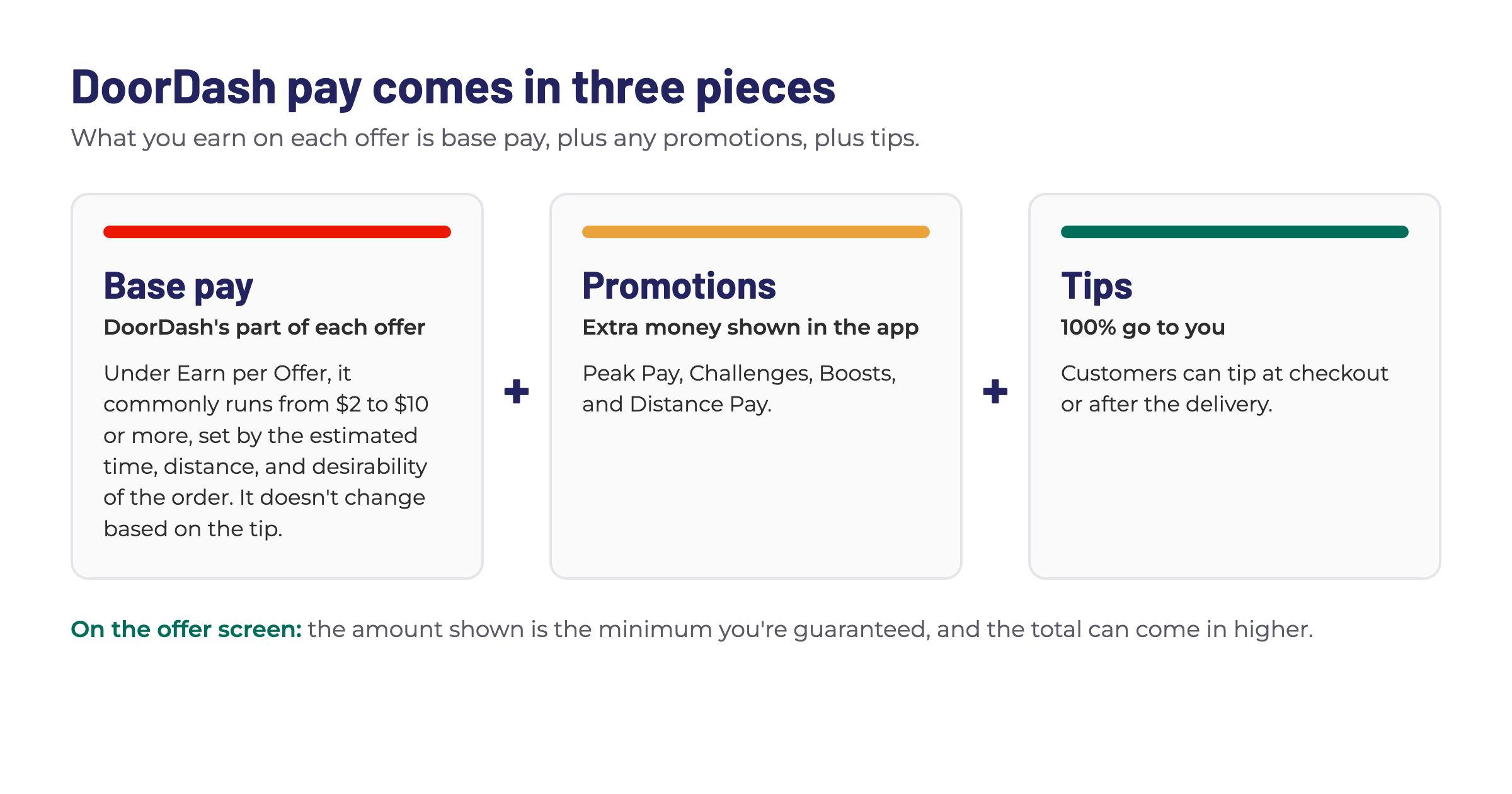
Under Earn per Offer, base pay commonly runs from $2 to $10 or more, set by the estimated time, distance, and desirability of the order. The amount on the offer screen is the minimum you’re guaranteed, and the total can come in higher [7].
Earn by Time is only offered in select US markets. It pays a minimum hourly rate for active time, from the moment you accept an order to the moment you complete it, with tips and promotions on top. Time spent waiting for an offer isn’t paid. You get one decline or unassign per hour, and every decline counts toward your acceptance rate. A second one in the same hour ends your Earn by Time session, though you can switch to Earn per Offer and keep dashing [8].
If you’re still deciding between DoorDash and other gig apps, Sergio Avedian’s look at which apps pay the most puts the platforms side by side. Seamlessly drive for multiple apps with Mystro.
How and when do you get paid as a DoorDash driver?
You can take your pay weekly for free or pay a small fee to get it sooner. The table shows what each option costs and when the money lands.
Payout option | Cost | When the money arrives |
|---|---|---|
Weekly direct deposit | Free | Covers Monday to Sunday deliveries; processing takes two to three days, and it usually appears by Wednesday night [7] |
Fast Pay | $1.99 per transaction in the US | Daily cash out to a debit card that isn’t prepaid, subject to eligibility |
DoorDash Crimson | No monthly fee | Typically within seconds, subject to availability, eligibility, and approval [6] |
Add your bank account in the Earnings tab before you start dashing, so your first week’s pay has somewhere to go.
What happens on your first DoorDash shift?
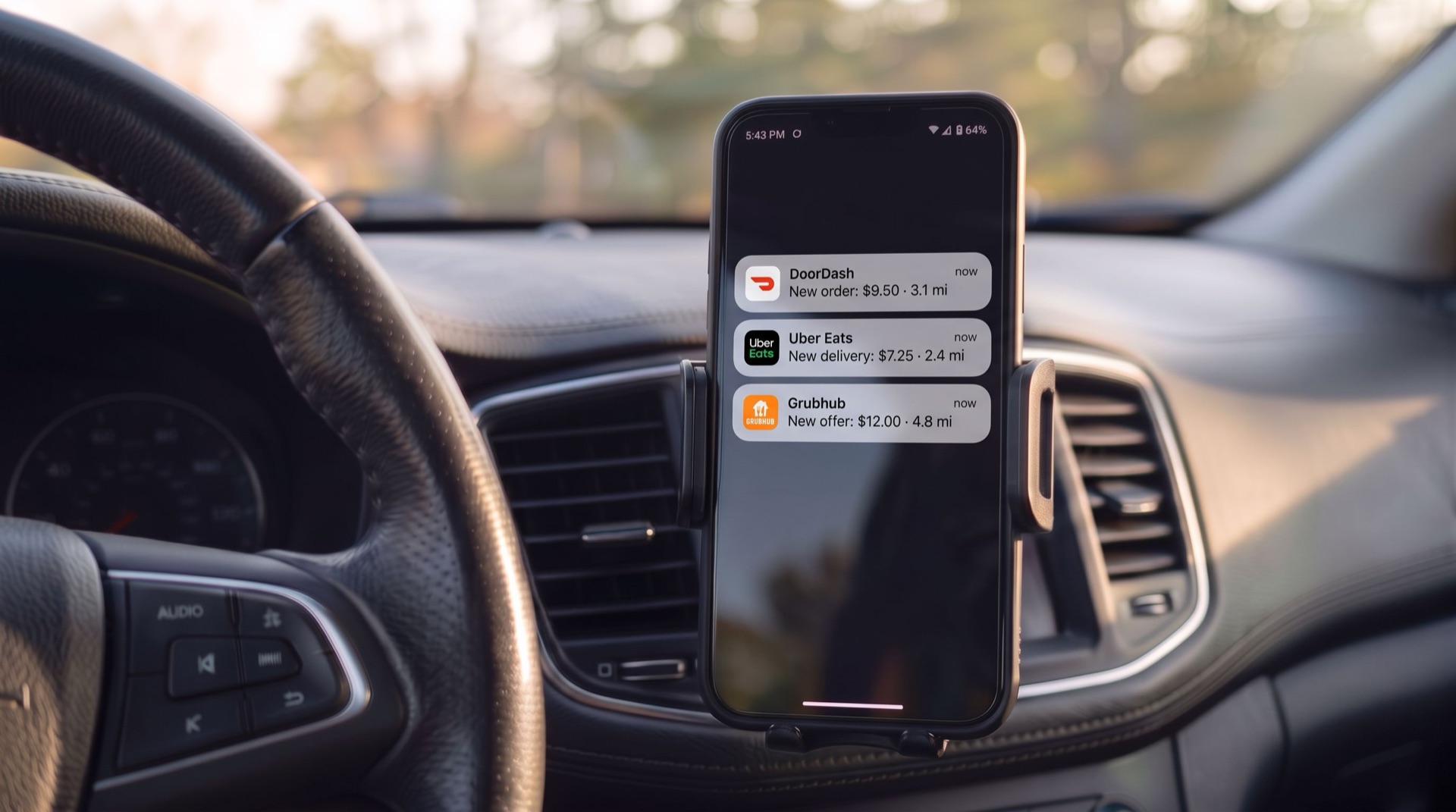
Let’s say it’s 5:15pm on a Friday. You’re parked in a strip-mall lot two blocks from a row of busy restaurants, the app is open on the phone in your dashboard mount, and you have to decide: tap Dash Now and start, or wait for the dinner rush to build. That’s the first call every new Dasher makes, and the app gives you two ways to make it.
Should you Dash Now or schedule ahead?
Dash Now starts you right away when your zone is busy. Scheduling lets you reserve a time slot up to five days out [9]. The busiest stretches are usually lunch, from 11am to 2pm, and dinner, from 4:30pm to 8pm, which is why so many drivers plan around the lunch rush and the dinner window.
On the map, a flame icon marks a hotspot, an area that’s busy right now [10]. When an offer comes in, the card shows the minimum you’ll earn and the distance, and you have 50 seconds to decide. If the timer runs out, it counts as a decline [11]. You can accept or decline any offer, and there’s no minimum acceptance rate to stay active. DoorDash advises checking your phone only when you’re safely parked [12]. If you can’t pull over in time, let the offer go. You can also tap Pause when you’re not ready for offers [11].
How does your first delivery work?
Accept the offer and head to the pickup. The app gives you directions.
Tell the staff you’re a Dasher with DoorDash. The order is already paid for.
Follow the drop-off instructions in the app and take a photo if it asks for one.
Check your earnings for that order, then wait for the next offer.
Your Dasher gear, including the insulated bag, ships after you finish your first Dash, and through Instant Dash, select new Dashers can start before it arrives. If orders are slow that night, the usual fixes for not getting orders start with where you wait, and finding the busiest areas near you gets easier every week.
Pick your starting zone before you leave: The Dasher app map shows where demand is right now. The free Mystro DoorDash Heatmap shows where it usually is at this hour on this day, so you start in the right zone instead of chasing the map.
How much do you keep after costs and taxes?
The number in the app isn’t your pay. Your pay is what’s left after the car and taxes take their share.
What costs come out of your DoorDash earnings?
DoorDash itself names the costs that change what you earn: gas, maintenance, insurance, and your phone plan [10]. Drivers add their own to that list, like parking and tolls. Every mile you drive between orders costs you money too, which is why cutting idle time and empty miles pays off over a month.
If you’ve never worked out what cost per mile is, it’s what it costs you to run the car for every mile you drive. Add up a month of the costs that rise with every mile, like gas, oil changes, tires, brakes, repairs, and depreciation, then divide that total by the miles you drove for DoorDash and your other apps that month. If those costs come to $1,200 over 4,000 miles, your cost per mile is 30 cents. Once you know it, you can look at any offer and see what’s left after the drive.
More on cost per mile: Sergio Avedian’s guide to cost per mile explains what goes into the number and how to work out your own.
How do mileage and taxes work for DoorDash drivers?
You’re an independent contractor, not an employee, so DoorDash doesn’t withhold taxes from your pay [13]. Here’s what the IRS rules mean for you:
Filing: you need to file a return if your net earnings from self-employment are $400 or more.
Self-employment tax: it’s 15.3%, made up of 12.4% for Social Security and 2.9% for Medicare, and it applies to 92.35% of your net earnings [14].
Quarterly payments: estimated tax is due four times a year, on April 15, June 15, September 15, and January 15, moving to the next business day when a date falls on a weekend or holiday [13].
Mileage: the 2026 standard business mileage rate is 72.5 cents per mile from January 1 to June 30 and 76 cents per mile from July 1 to December 31 [15].
A mileage record backs up every one of those miles, and the guide to rideshare taxes explains what to keep and how the deduction works.
Let’s say you finish a Saturday dinner shift in November with $200 in earnings after 100 business miles. These numbers are made up to show the math. At 76 cents a mile, the mileage deduction is $76, which leaves $124 of net profit. Self-employment tax on $124 is $124 x 0.9235 x 0.153, or $17.52, so about $18 before any income tax.
The $76 is the IRS deduction rate, not what the car cost you that night, and what each mile really costs you could be higher or lower. Check these numbers against the IRS pages linked here, or with a tax professional, before you file.
Find your real cost per mile: The free Cost Per Mile Calculator works out fuel, maintenance, and depreciation in about five minutes.
How do you decide which DoorDash offers are worth taking?
Most Dashers read the pay and the distance on every offer card before they accept. The next step is turning those two numbers into dollars per mile and dollars per hour, inside the 50 seconds DoorDash gives you to decide.
Dollars per mile is the pay divided by the miles. Say an offer shows $9.00 for 6 miles: that’s $1.50 a mile. It matters because your car costs you money every mile, including the deadhead miles you drive with no order on board, and a payout that looks fine can shrink once you take out what each mile costs you. Per mile alone isn’t the whole picture, though, because a short order with a long wait at the restaurant eats your time, and so does sitting idle between offers. So run the same check on time: divide the pay by the estimated minutes and multiply by 60 to get dollars per hour.
You can decline freely. DoorDash says there’s no minimum acceptance rate to stay active [9]. Declining at the offer stage is the safe move. Accepting an order and then canceling is what hurts your completion rate.
Frequently asked questions about becoming a DoorDash driver
How old do you have to be to deliver for DoorDash?
You need to be 18 in most states. The minimum is 19 in Arizona, Colorado, Delaware, Florida, Georgia, Idaho, Kentucky, Montana, New Jersey, New Mexico, Texas, Utah, and West Virginia. In California, new applicants must be 21.
Do you need experience to become a DoorDash driver?
No. DoorDash doesn’t require any prior delivery experience, and there’s no year requirement for the car you use. Meet the age rule, have the right license or ID for your vehicle, and pass the identity and background checks. After that, the app gives you directions to each pickup and drop-off.
How much can you make as a DoorDash driver?
DoorDash’s pay page advertises a national figure of $25 per hour worked, tips included. That’s before gas, maintenance, insurance, and your phone plan. What you take home depends on the offers you accept, when you drive, and where. The costs section above shows how to work out what you keep, and the comparison of which gig app pays the most covers how DoorDash stacks up.
Do you get to keep your tips?
Yes. 100% of tips go to you. Customers can tip at checkout, or add a tip up to 30 days after the delivery. Tips don’t change your base pay, so a good tip is extra money on top of what the offer showed. One catch: a tip added after delivery won’t show on the offer card, so judge each offer on the number in front of you.
Do you need a hot bag or Red Card before your first Dash?
No. Your activation kit, including an insulated bag, ships after that first Dash, and through Instant Dash, select new Dashers can start right away. You’ll need a Red Card later if you want shop and deliver offers [3].
How to get ready before your first DoorDash shift
Here’s the order to work through before your first shift:
Check your age, vehicle, and ID against the requirements for your state.
Call your insurer and ask whether a paid delivery is covered.
Finish sign-up and wait for your background check to clear.
Add your bank account in the Earnings tab.
Work out what each mile costs you with the free Cost Per Mile Calculator.
Open the Mystro DoorDash Heatmap, pick a starting zone, and sign in to the Dasher app before the meal window starts.
Let Mystro do the offer math: Mystro works out the dollars per mile on every offer and declines the ones under your minimum at the offer stage, never after you’ve accepted, so your completion rate stays clean. Download Mystro from the App Store or Google Play.
References
[1] DoorDash Help Center. “Requirements for Dashing.” DoorDash, accessed October 25, 2026. https://help.doordash.com/en-us/dashers/article/requirements-for-dashing
[2] DoorDash. “DoorDash requirements: What you need to start delivering.” DoorDash, accessed October 25, 2026. https://dasher.doordash.com/en-us/requirements
[3] DoorDash Help Center. “Dasher Signup Process.” DoorDash, accessed October 25, 2026. https://help.doordash.com/en-us/dashers/article/dasher-signup-process
[4] Texas Department of Insurance. “Delivering packages? What to know about auto insurance.” Texas Department of Insurance, accessed October 25, 2026. https://www.tdi.texas.gov/tips/delivering-packages-what-to-know-about-auto-insurance.html
[5] North Carolina Department of Insurance. “Driving for a Transportation Network or Delivery Network Company.” North Carolina Department of Insurance, accessed October 25, 2026. https://www.ncdoi.gov/consumers/auto-and-vehicle-insurance/driving-transportation-network-or-delivery-network-company
[6] DoorDash. “Dasher Pay: How DoorDash Delivery Drivers Get Paid.” DoorDash, accessed October 25, 2026. https://dasher.doordash.com/en-us/about/pay
[7] DoorDash Help Center. “How Dasher Pay Works.” DoorDash, accessed October 25, 2026. https://help.doordash.com/en-us/dashers/article/how-is-dasher-pay-calculated?ctry=US
[8] DoorDash Help Center. “Earn by Time mode.” DoorDash, accessed October 25, 2026. https://help.doordash.com/en-us/dashers/article/time-earnings-mode
[9] DoorDash Help Center. “The New Dasher Guide.” DoorDash, accessed October 25, 2026. https://help.doordash.com/en-us/dashers/article/new-dasher-roadmap
[10] DoorDash. “How to get started on DoorDash.” DoorDash, accessed October 25, 2026. https://dasher.doordash.com/en-us/getting-started
[11] DoorDash Help Center. “Dasher Ratings Explained.” DoorDash, accessed November 14, 2026. https://help.doordash.com/en-us/dashers/article/dasher-ratings-explained
[12] DoorDash. “Getting Started as a Dasher: A Guide to Your First Dash.” DoorDash, September 4, 2026. https://dasher.doordash.com/en-us/blog/what-to-expect-when-starting-to-dash
[13] Internal Revenue Service. “Manage taxes for your gig work.” IRS, accessed October 25, 2026. https://www.irs.gov/businesses/small-businesses-self-employed/manage-taxes-for-your-gig-work
[14] Internal Revenue Service. “Topic no. 554, Self-employment tax.” IRS, accessed October 25, 2026. https://www.irs.gov/taxtopics/tc554
[15] Internal Revenue Service. “Standard mileage rates.” IRS, accessed October 25, 2026. https://www.irs.gov/tax-professionals/standard-mileage-rates
This post first appeared in The Mystro Newsletter — driver tips, earnings strategies, and Mystro updates, in your inbox every week.