How to use AI to analyze your rideshare earnings (with copy-ready prompts)
Upload your Uber and Lyft trip history, run six prompts, and test one change at a time.

Ever wondered about uploading your Uber and Lyft trip history to ChatGPT and getting a clear breakdown of where your money actually comes from?
Using whatever prompts you like, you might find patterns in your earnings, identify what you’re doing well, or get suggestions on filter changes to test on your next few shifts. Then you can bring back fresh data and see if it paid off.
AI cannot predict the future and plan a perfect shift for you. It cannot access live/current gig platform data, so it can’t tell you the exact right thing to do, right now.
By attempting different strategies over time and reviewing their outcome, you can take a trial-and-error approach until finding the strategy that works best for you.
What AI does best:
Turns a pile of trip records into numbers you can actually read
Answers plain-English questions about your data, like a data analyst would
Spots patterns you might not catch on your own
Use Mystro to set filters, gather more data, and optimize your driving earnings.
Which AI to use (and why it matters)
Here’s the catch. Not all AI can do these three things. Many AI options, especially the free ones, are large language models (LLMs). You know when you’re typing a text and the word predictor guesses your next word so you don’t have to type it? That’s basically what an LLM is; it’s just guessing what an entire response looks like.
Which means that LLMs do not do math. They just guess what math looks like. Sometimes they’re right. Maybe even usually, they’re right. But a lot of the time, they’re confidently wrong. This is what we call hallucinations.
Since the main thing we’re doing is dumping a whole lot of numbers in, you’ll want to use an AI built specifically for that purpose. While some LLMs have ‘plugins’ that can execute code and do math if the LLM ‘chooses’ to activate the plugin, they aren’t super consistent.
That’s why ChatGPT and Claude are the best free picks for this. Both run real code on files you upload, so you get actual math instead of pretend math. If your data’s already in Google Sheets, Gemini can work on it there too.
The free versions work fine for a first pass. If you run this often, you’ll likely hit usage limits, and you’ll either need to upgrade or wait for your limit to reset. Before you pay, do the math.The extra earnings from analyzing your data could be minimal, and if you’ve been driving a while, a monthly subscription may cost more than the analysis finds you. But if you’re already paying for an AI subscription, feel free to use it.
How to download your gig app trip data
Once you’ve picked your AI you need something to give it. You can download your data from whichever platform you drive for: Uber, Lyft, DoorDash, Instacart, and more. (If you’re struggling to download your personal driver data, don’t hesitate to reach out to that app's support team.)
This data typically includes only completed and paid trips. It won't include data on offers you didn't take, or how busy things were (or weren’t) when you weren’t online, or places you didn’t go.
I drive for Uber and Lyft, so I’ll use those as examples. When you request data, you get an immediate email confirmation, and then the data comes a little later.
Once you have the data, upload it as a file to the AI you’re using. (Just upload the zip file directly; it can unzip it.) I used ChatGPT for this walkthrough.
Uploading it as a file activates the actual coding environment that treats the numbers as numbers and does math on them; if you just paste some of the data into the text box, you’re activating the “what does math look like” issue with the LLM side of things. So make sure you upload the file directly.
Your export includes personal info like trip times and locations. Before you upload, check your AI’s privacy settings, including whether your chats can be used to train the model.
Designing your prompt to get what you want
Now the part that makes or breaks the results you’ll get: The prompt you give.
The Intro: Tell it who you are and what you want
First, give ChatGPT information about you and your end goal. Feed AI a prompt like this:
I am a rideshare driver for Uber and Lyft. Attached are the trip history files from the platforms. In future responses in this conversation, I will provide updated history files, and possibly additional information (such as when and what strategy changes were made, or additional data I am able to provide). Your goal is to help me maximize my earnings, by explaining this data to help me understand it, and suggesting strategies.
In the intro, you’re basically saying who you are (so it knows how to talk to you), what you’ve attached and what it is, how the conversation is going to go, and what the goal is (why you’re even having the conversation in the first place).
This sets the overall ‘understanding’ of what this conversation is going to be and separates it from asking it to tell you a funny story about a cat chasing a chicken.
Give it context and caveats
After giving the intro, give ChatGPT the context with this prompt:
Important context:
I multi-app with Mystro. When I accept a ride on one platform the other goes offline.
My current filters are $30/hr, $0.85/mile, and passenger rating above 4.8.
The filters I am unwilling to change are: my passenger rating filter.
The data provided by the platforms are limited. Make no assumptions that are not directly supported by the type of data provided. (For instance, a lack of trips in a time period or area usually means I was offline, not that demand was low.)
Unless otherwise identified by the user, assume the user's driving schedule is unlikely to change from the historical data.
Unless otherwise identified by the user, assume that the data provided in the attached files is the extent of the driver's ability to provide data; you may suggest additional ways to acquire and provide data, but do not base any responses on requiring them.
Known data caveats:
Uber has trip-level pay components, while Lyft’s file mainly has ride timestamps and payout transfers rather than fares.
Most Uber tips can be associated with the corresponding ride, but not all transaction timestamps map cleanly to a ride record.
There may be additional data limitations beyond those listed here, including multiple aspects where missing data should not be used as positive evidence. Be sure to list any limitations you find in the disclaimer (step 2).
A lot of context is being provided here to proactively prevent some potential issues with your response.
The Mystro line tells the AI that your online time overlaps across both apps, since accepting an offer on one takes you offline on the other. If you’re only uploading one platform’s data, cut it.
Your current filters let the AI judge your results against your actual settings. If you know when you changed them, include the dates so it can compare before and after. List any filters you won’t change so it doesn’t waste a suggestion on them.
The “use only the data” rules are the most important part. Without them, the AI sees zero afternoon trips and concludes there’s no afternoon demand, when really you just don’t drive afternoons.
The schedule and data lines keep the advice usable. I already know when I want to drive, so suggestions to drive different hours don’t help me. And the only data I have is the platform exports. If you track gas or mileage, add it, and the AI will use it.
The known caveats are two that ChatGPT flagged every time I ran this. Listing them up front saves it from rediscovering them.
Instructions: Tell it what to analyze
With the context set, it’s time to tell AI what to actually do. I’m going to outline six steps for you to put into ChatGPT. Copy and paste the following prompts with your own personalizations added in:
Step one: Except for step 6, use only the numbers in the attached files. Do not invent data or add external assumptions.
Step two: Identify any caveats in the data that limit their usefulness. Briefly mention any limitations, and flag data that is too thin to draw a conclusion, or is missing, or incomplete. Include a disclaimer section at the end of the response (after step 6) that aggregates all limitations.
The first instruction is just an additional constraint to prevent hallucinations. It will only use numbers from the files you attached.
The second instruction is to set up a disclaimer to include at the end. It’ll also put minor disclaimers in every section that follows as well.
Now we move on to the next prompt to give it:
Step three: First give me clean aggregations (no advice yet):
Identify the most useful aggregation patterns for the driver to more easily understand the data, and display the data in that format.
Analyze tips separately, and provide any useful aggregation patterns for them.
The focus is on maximizing overall earnings. Any aspect of the earnings that the driver might be able to influence and control should be called out on what the historic performance so far has been. Tips are only valuable for chasing to the extent that they increase overall earnings.
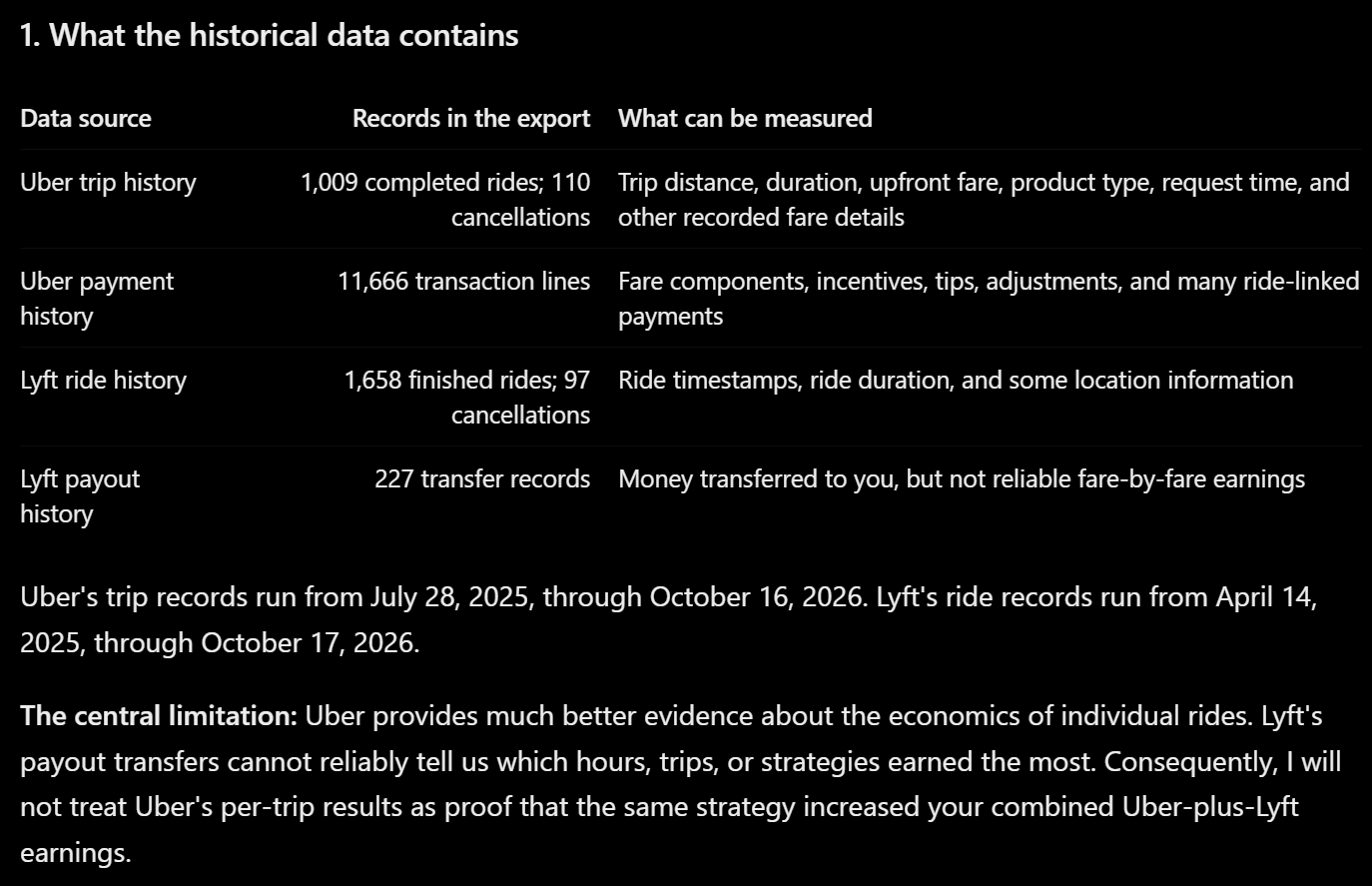
The first part is a flexible way to get data that you can understand. Here’s an example of that output:
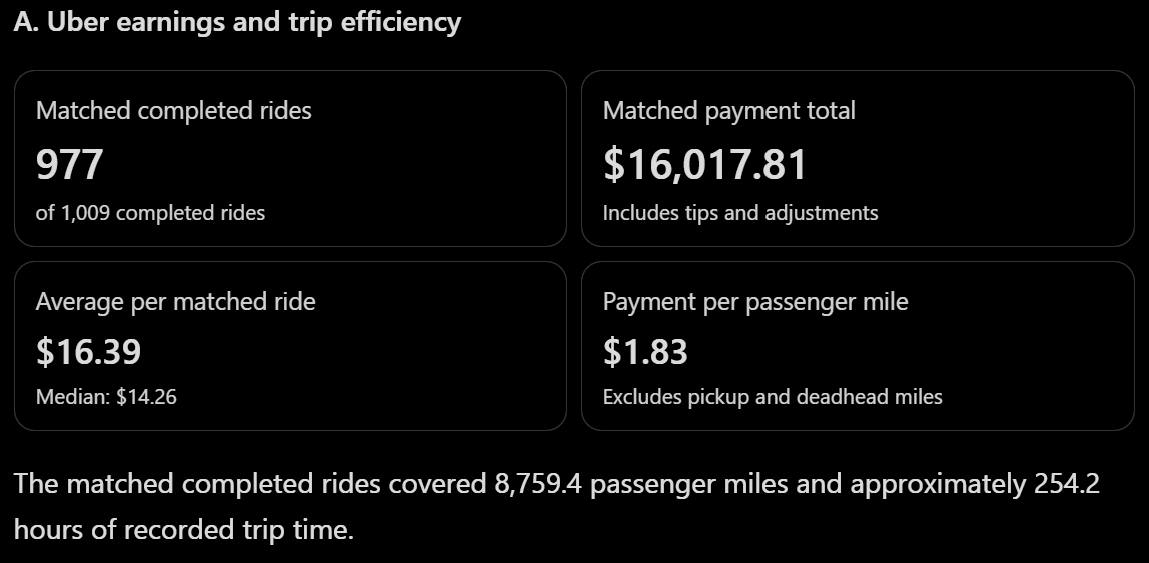
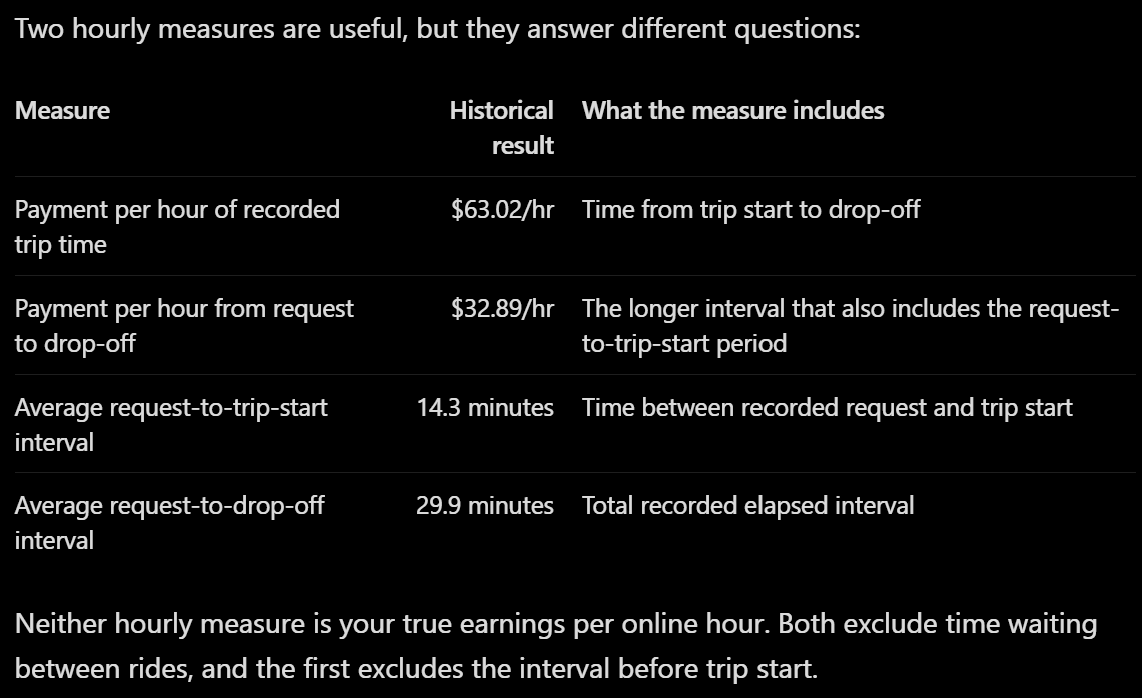
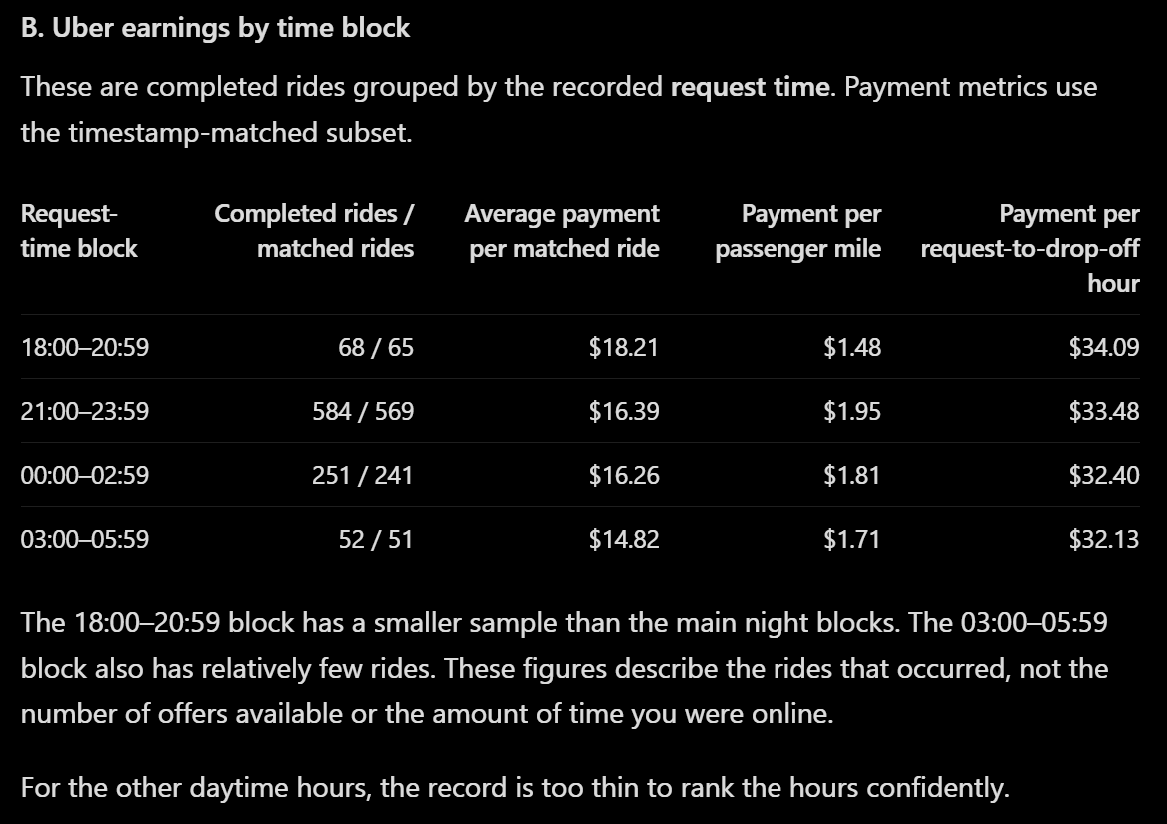
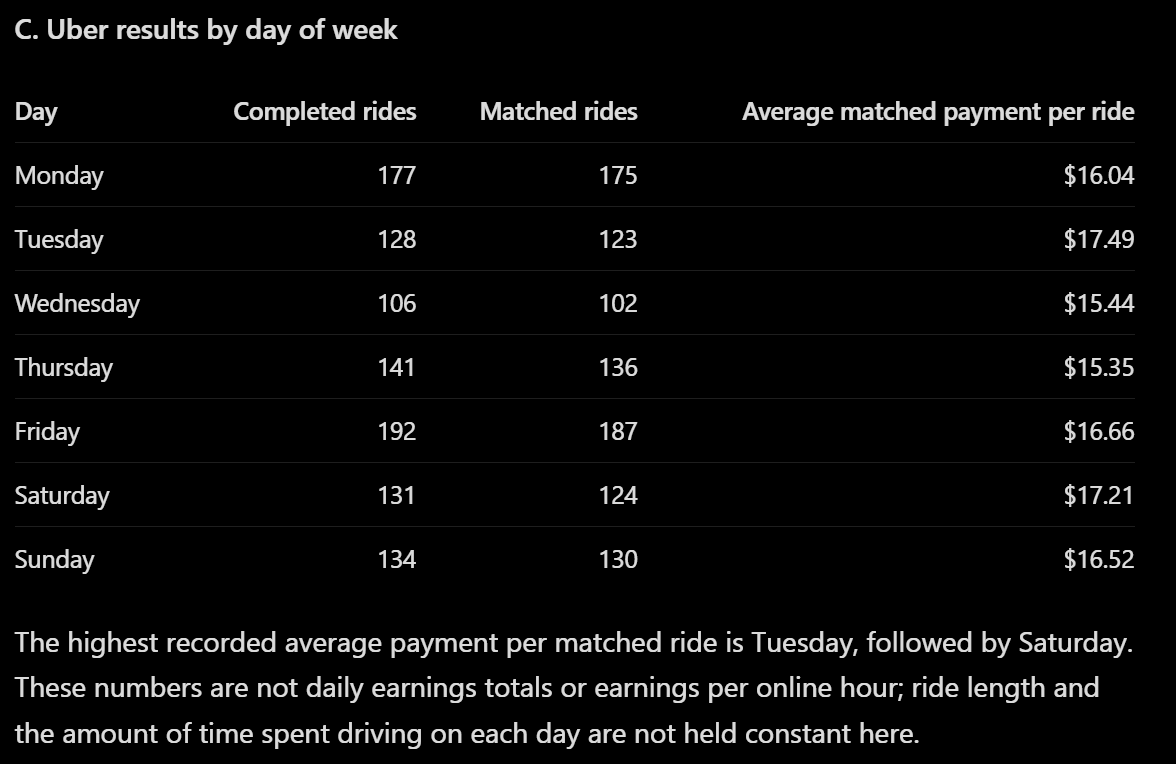
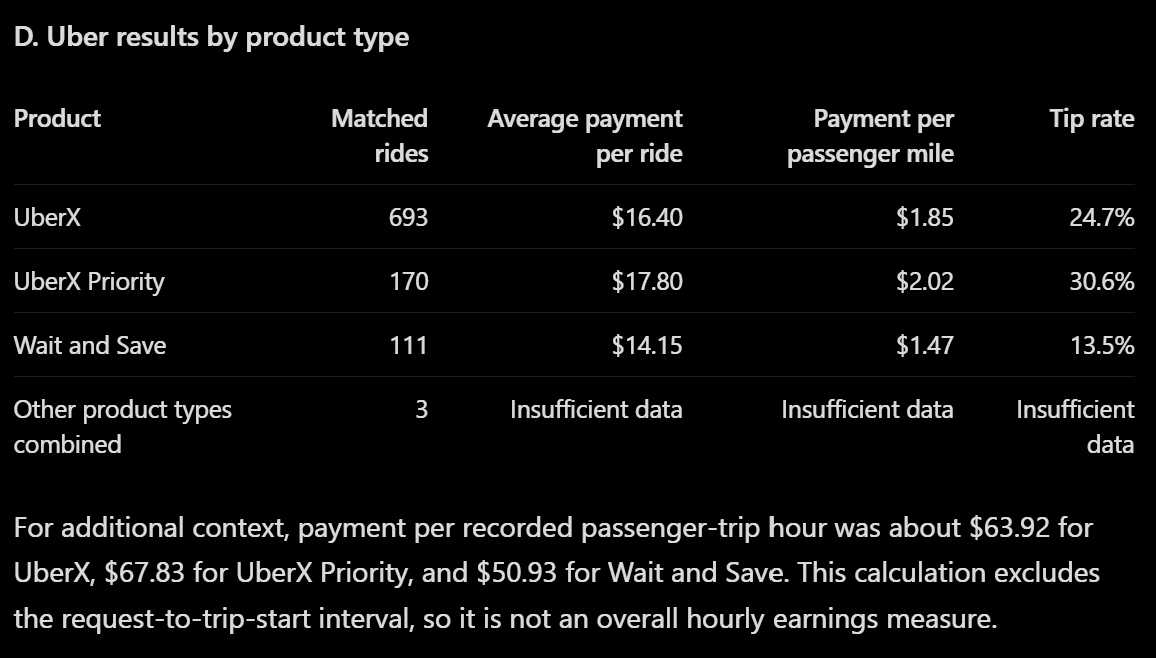
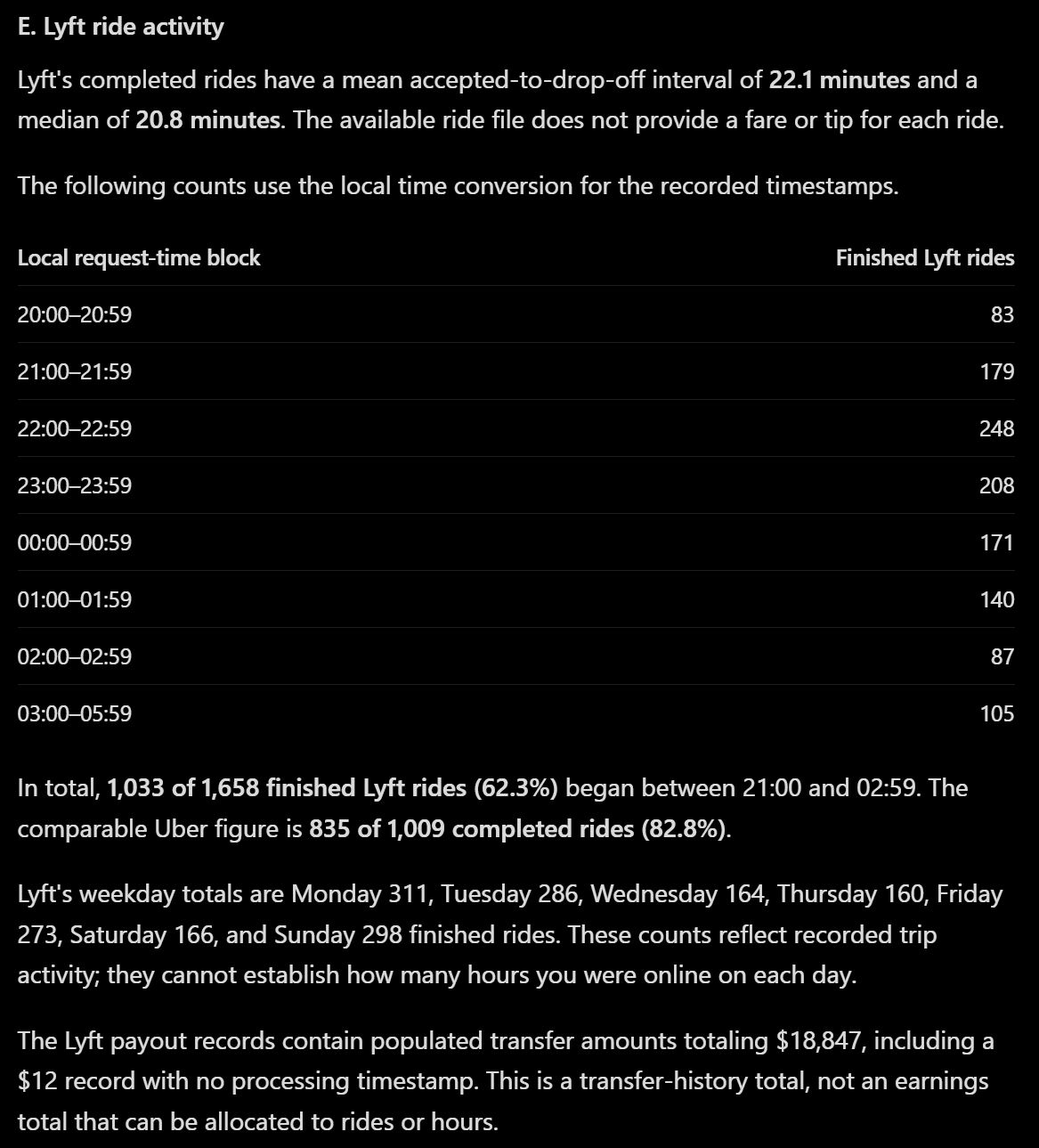
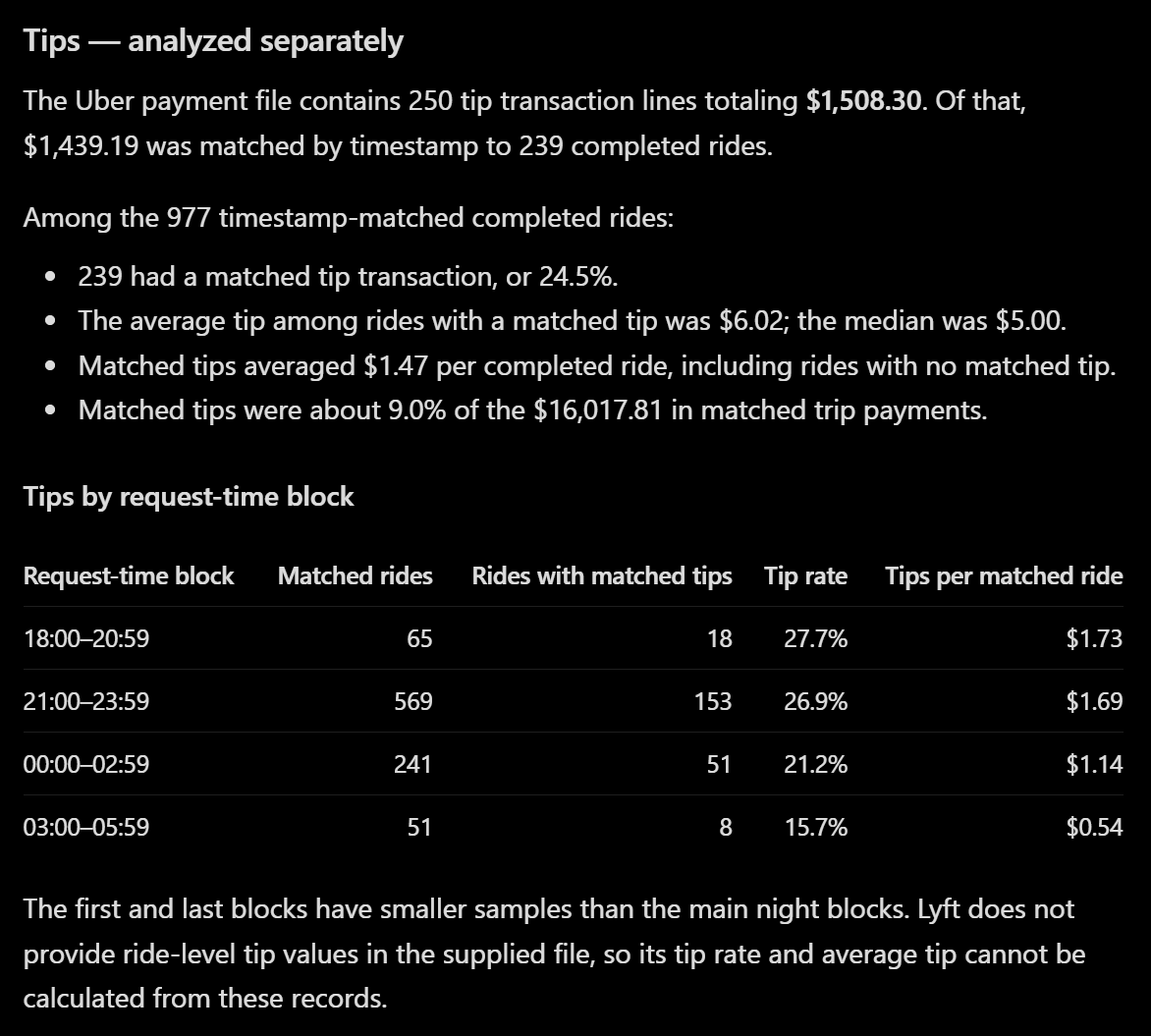
This is nice information to have. But now that we have the numbers, we can move onto the next prompt:
Step 4: Only after the numbers, give me insights that are specific to MY data. Skip any advice you could give to a driver without seeing these files.
Optional: Identify one 'interesting curiosity' or 'fun fact' insight. Something the driver would likely not have already known but might find interesting or unique. Skip if no relevant fact arises, or if the fact has already been mentioned in this conversation.
Identify 1-3 'strengths' of what the driver is doing well, for the goal of maximizing earnings. If there is not enough confidence to give at least one, describe what data is needed in the next report.
Identify 1-3 'weaknesses' of what the driver is doing poorly, for the goal of maximizing earnings. If there is not enough confidence to give at least one, congratulate the driver for doing well.
Here is where we ask for the AI to actually give us something we don’t already know. And we specifically make sure it’s not fortune-cookie horoscope-type “have you tried driving during peak demand” stuff you could say to any driver without their data. This cuts out a lot of the fluff.
Here’s what AI told me after I used this prompt:
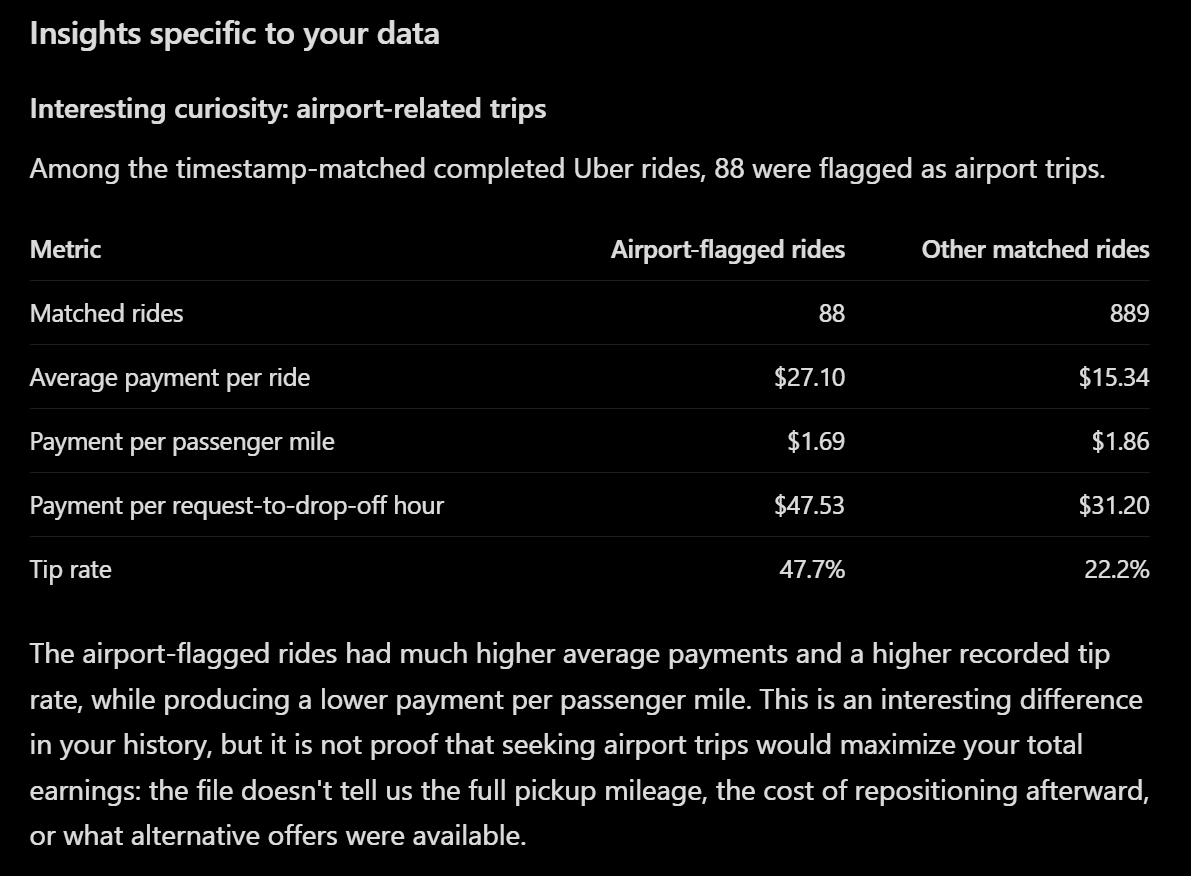
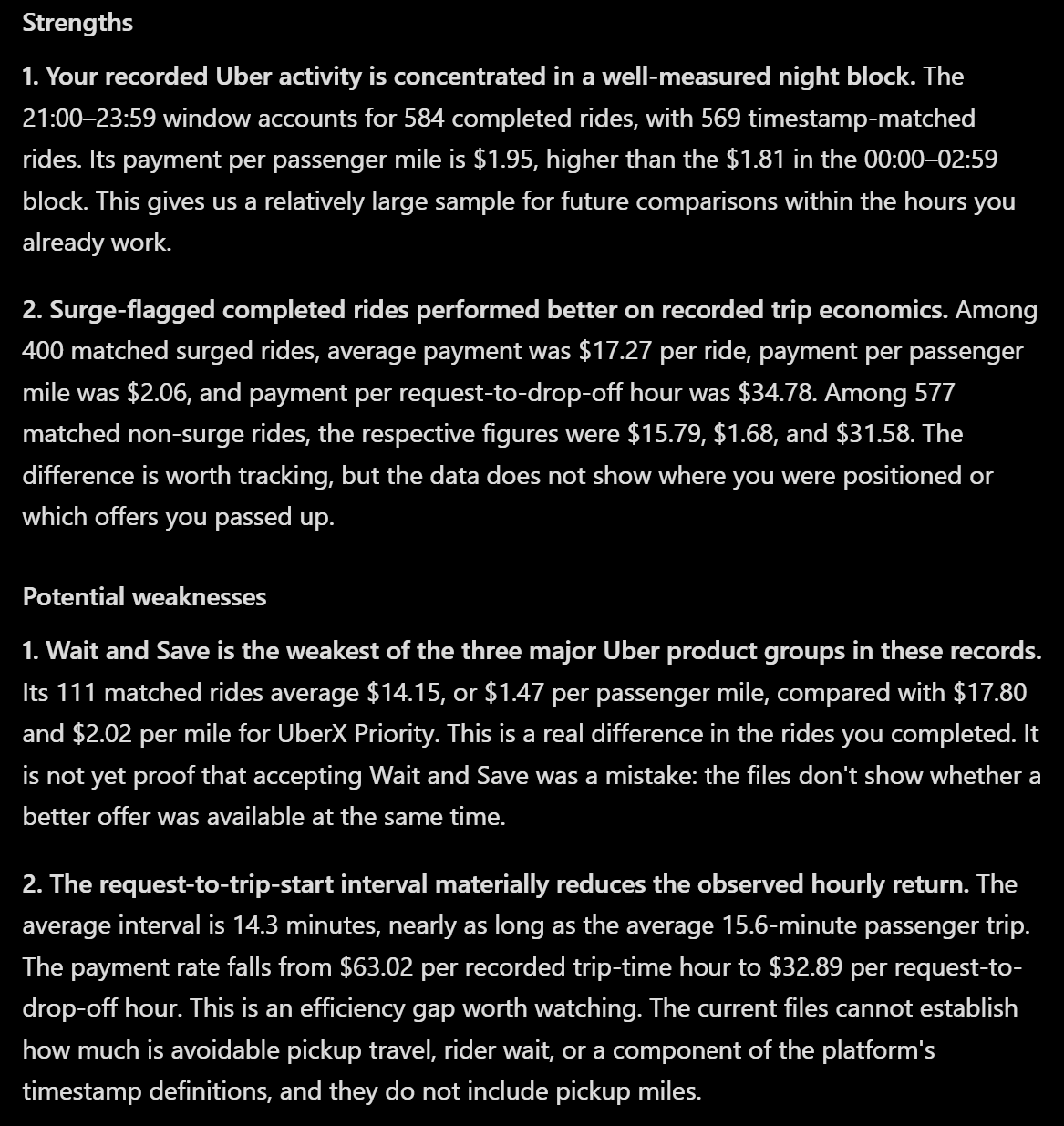
Even when you specifically direct the AI to use your data to give you insights, this is an example of the low-value return you might actually get. The AI looked at all my data and basically said:
Airport rides pay better
You tend to drive at night a lot
Surges pay better than rides without surges
Wait and Save trips paid less, and those riders tipped less
You get paid more for the part of the trip with the passenger in the car than you do for the drive to pick them up
In all honesty, you don’t need data to know these conclusions. You could probably understand these without putting your data in. Even though we told the AI to avoid such conclusions, it did it anyway.
But I’m an experienced driver who’s done this a while, and I’ve heard a lot of those recommendations through other channels already. If you’re a new driver, this is a way of getting advice that’s specifically tailored to your driving patterns and not anyone else’s.
What the data won’t give you
Part of the problem isn’t always the AI. It’s that you weren’t able to give it the data to analyze. Quick list of what the official exports don’t give us:
Any record of the offers that were declined or filtered out
What the other app was showing at the same moment
Reliable ride-level earnings on Lyft
Clean tip-to-ride matching
Pickup/deadhead miles (You might be able to estimate this a little if you have dated odometer reading data you can also give the AI)
Actual online time as a usable denominator
Consistent location data for pickup + drop-off
What Mystro filters were active when each offer came in
In general, Uber’s data is more ‘complete’ than Lyft’s, and gives you more understanding of your per-trip data. If you only give it data from one, use Uber’s. Lyft has better GPS data, but only of where you were when you accepted offers, not where the offers took you. They will also report for different date ranges. There’s no reason you can’t hand both to the AI, though, and let it sort it out.
Looking to the future
We can still use the information we have to learn more, though. I did this as a continuation of the original prompt. You could also wait for that to calculate first and then rewrite the following pieces as their own prompts.
Copy and paste this into ChatGPT:
Step five: Suggest exactly one change in strategy to test for this set of data. Here are the constraints:
The change must be implementable with Mystro filters that are known to exist and are visible at offer time, and/or a simple positioning decision within the hours already present in my data.
Do not recommend driving new days or new hours as the test. (Assume the driver will make their own schedule, which is likely to be similar to their driving history.)
State how long to run the test.
Only recommend a test whose results could be meaningfully evaluated using the type of data that has already been provided by the user.
The experiment should generate evidence useful for deciding what to test next.
Minimize the risk of reducing earnings while testing.
You optionally may suggest ONE method of easy-to-acquire, high-value data, which will help inform the next test. Provide short and simple, easy-to-follow instructions of how the driver may acquire that data. If the data would be too difficult to acquire, do not mention it.
After this prompt, this is what I was given:
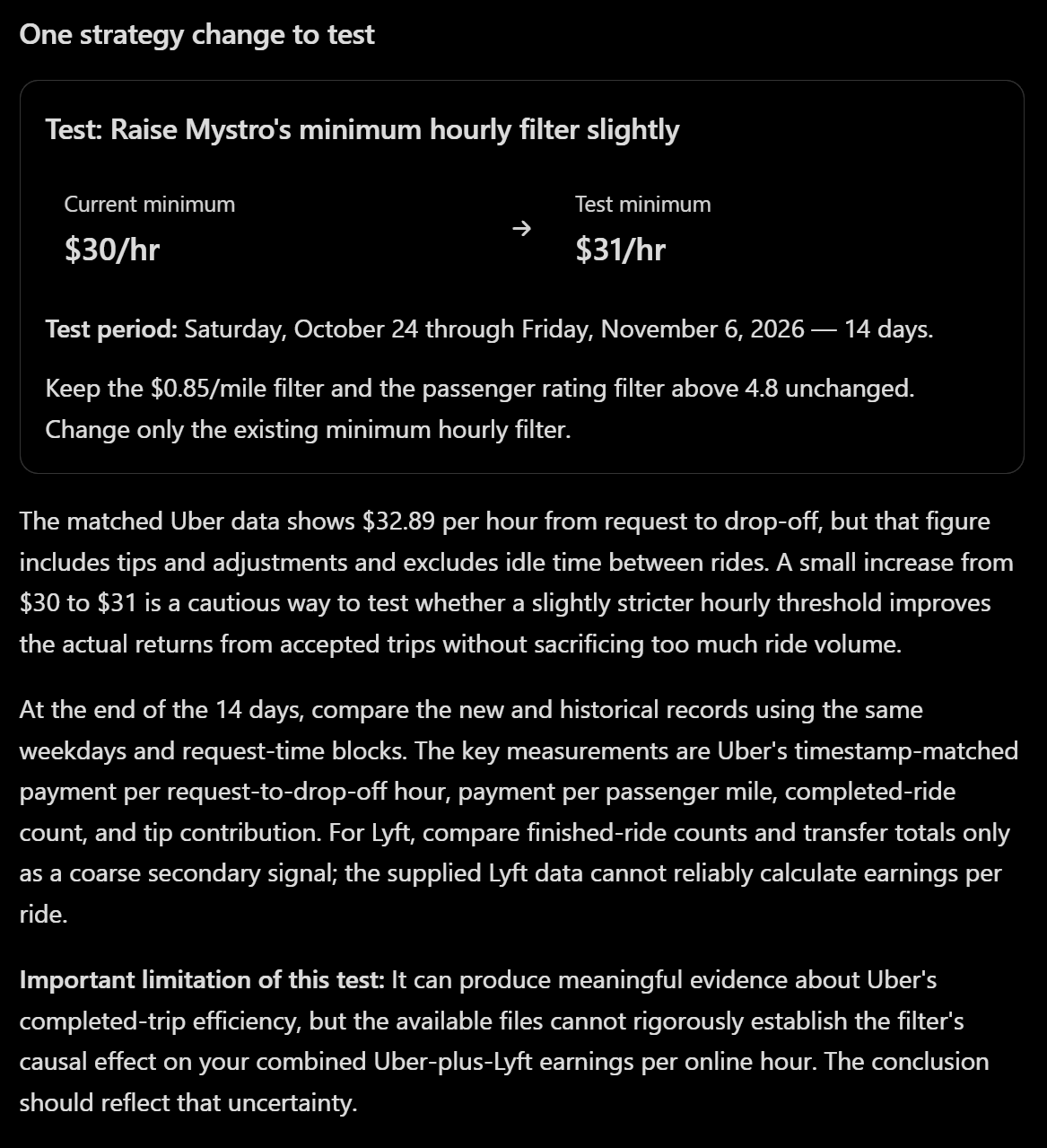
This one’s actionable. Lately I’ve been getting offers within seconds of going online, even with my filter at $30/hr. I’d already been thinking about raising it so I’m not leaving money on the table, and the AI’s suggestion backed that up.
The idea is a simple before-and-after test. If I perform this test and come back in two weeks, it can look at my earnings over that period and determine whether I actually came out ahead, or if I reduced my trip count by enough that I wound up making less money. I will need to pull my data again and confirm when I changed my filters and what I changed them to. It should then tell me how the test went and what to test next.
Over time and multiple trials of different strategies, you should approach optimal earnings.
Here is the riskiest part of using an AI. We’re going to try to prevent hallucinations here, but I strongly suggest that you fact-check any of the answers you get here, outside of the AI, before completely depending on it. This is the section to take most with a grain of salt.
Now, let’s move on to the last prompt:
Step six: Only after completing step 5, perform a live search of any potential upcoming rideshare demand in the driver's area that may occur during the test period defined in step 5. This is not part of the test, it is just using the same time period as a time constraint.
Include only events with expected attendance large enough to create a noticeable concentrated post-event exit rush (whatever threshold is realistic for the user's market). In this case, position should be near the event, and pickup time for shortly before the demand is expected.
Do NOT recommend be-online timing for drop-offs to the beginning of an event, unless the event is exceptionally large (for instance, top 100 events of the year in probable rideshare demand for trips to the event). In this case, position and pickup time range should be based on the most confident guess of when/where pickup demand is expected to peak (not the when/where of the event itself).
When applicable, the same event can be listed twice (the pre-event demand and the post-event demand), keeping in mind the slight differences in position and timing.
Each row of the chart should be a single event. Columns should be: name of event, position to aim for, date/time to aim for that position (can be a span of time), and reasoning/explanation.
Remove any 'events' that are low confidence in data category (accuracy in position, time, earnings potential), or give any indication of being a hallucination or outdated/invalid data.
Compare any events which have duplicate or very similar times. Merge the events that are in a very similar position. Then, if there are still timing conflicts, identify the event that's confidently superior in earnings potential and remove the other events that conflict.
Identify the one best time block outside of the driver's normal time block that is potentially the most profitable to drive (during the testing time period). This may or may not be associated with an event.
When displaying the chart, display the top 3-5 events remaining to the user, as well as the one additional most recommended time block, in chronological order. Combine the recommended time block and the events into a single chart.
This part asks the AI to search for events coming up during your test window.
Note that when events end are often much more profitable than when they start, so we make sure the AI keeps that in mind when making recommendations of when and where.
Also, I’m personally heavily weighted to keeping to my own schedule that I already have. So I slanted the prompt to focus mostly on events that I’m likely to already be on the road for, but also insert a single time block recommendation of “for your consideration” about driving outside a time I normally do.
Here’s the result I was given:
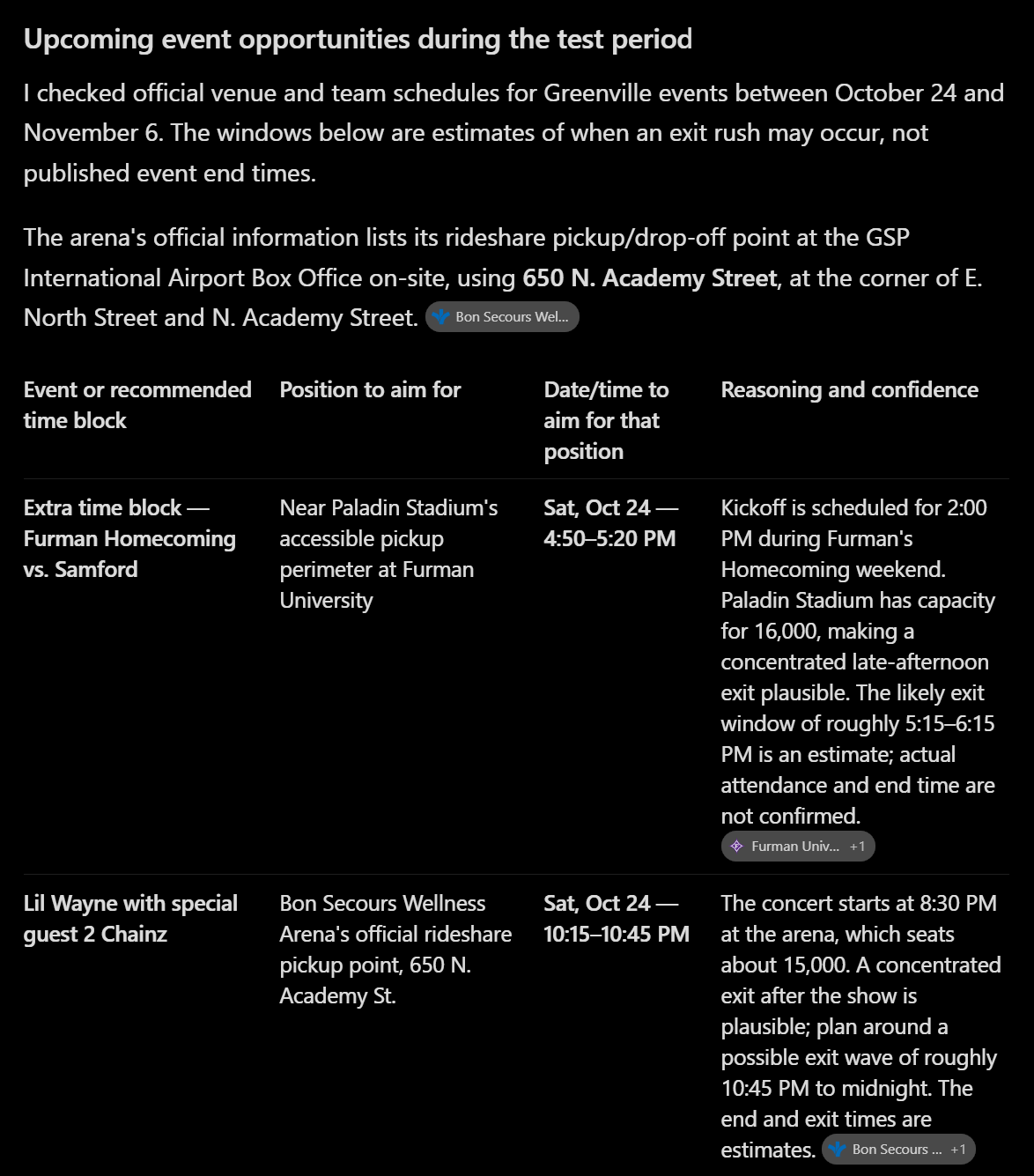
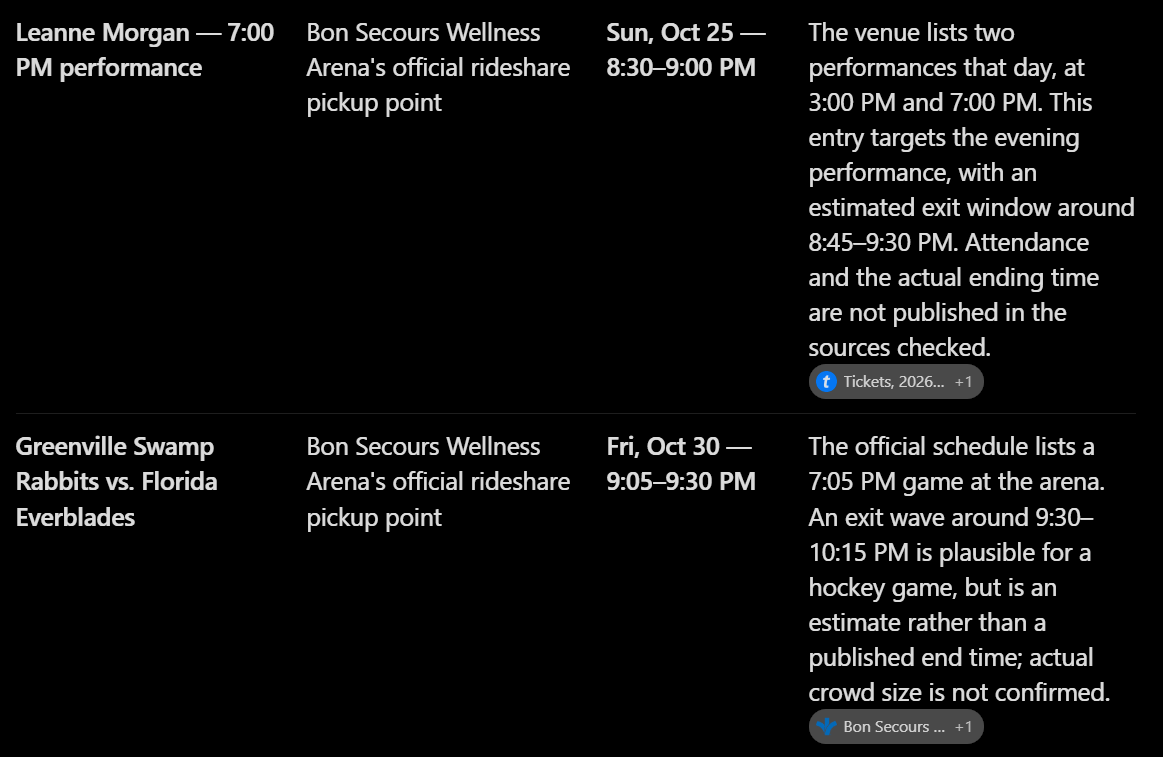
You can see the entire example interaction here if you like: https://chatgpt.com/s/t_6adbbb10a6f0819198f5b58dd37bc98d
You can also try this prompt if you want to continue that conversation (and attach your own data instead of mine).
I am a different driver that wants to use this prompt to have you review my data instead of the previous person’s. Please forget all the previous data but use the previous prompt to reply to the data I’m attaching now.
Using AI while driving
Everything so far happens before or after a driving shift. But AI can help while your driving too.
I’ve got a little button on my steering wheel that opens Gemini so I can ask a random question now and then. It’s helpful for idle curiosity, or to answer a passenger’s question if you don’t know (what’s good to eat around here?), but be careful about using it to get live/current answers, as it may hallucinate.
You can ask things like:
“Is there a concert in town tonight? Who’s playing? When does it get out?”: You’ll probably get a good answer to this.
“What’s the chance of rain where I am right now?”: The AI can retell weather reports with perfect accuracy. Whether the weather reports themselves are accurate, however…
“I am making a pickup at [address], what is the business name?”: Sometimes when it’s only the address, I like knowing the business name to know which parking lot to aim for. If the name has recently changed, AI might be outdated and give old info.
“I am at [location] and there’s a lot more traffic than there should be for this time of night. Is there an event happening here and now what would explain it?”: How I found out about a high school football game the other night. (I’m not a sports person.)
“What concerts are coming up soon?”: Answers to this will vary wildly. It might miss a concert happening right now, or tonight, to tell you about a bigger one in the next city over, next weekend.
“Where should I go right now?”: First, you’d have to explain you’re a rideshare driver looking for positioning advice, or you might get an answer that’s more existential. Even then though, you’ll very likely get a confident hallucination that won’t help you at all. Don’t ask this.
Basically, the more specific your question, the greater the possibility that you will get a specific and helpful answer. The more open and wide-ended your question is, the less likely an answer will be helpful.
Should you trust Uber, Lyft, and DoorDash’s AI assistants?
Not really? The AI in these tools are mainly to present the information that’s already available to you on the maps and stuff. It’s the same way you ‘trust’ the AI we gave our data to in the above example; it can spit the data at you easily, but insights and conclusions are hit-or-miss, and tend to be generic “I could have figured that out myself” kind of level.
Also keep in mind that the AI provided by the platform is for the platform’s best interest, not yours. Their goal is to get you to accept every drive, paying you as little as possible. Increasing your earnings is always the last priority.
If you have a basic question and you want to just ask it in natural language instead of find the answer yourself, then go ahead and use the AI. But that’s about the only reason to.
Use AI strategically
AI won’t tell you where to drive tonight. What it can do is turn your own trip history into a test you can run, measure, and repeat. Pick one change, give it two weeks, and bring the new data back.
The easiest change to test is your filters. Set your minimum $/mile, $/hour, and pickup distance in Mystro, and every offer on every app gets judged against the same floor.
This post first appeared in The Mystro Newsletter — driver tips, earnings strategies, and Mystro updates, in your inbox every week.