Sitting idle? Learn what to do if you're not getting orders on DoorDash or rides on Uber
How to stop sitting idle when your gig apps go quiet.

Thortok shares how he handles idle time on the road. Learn from his tips and experiences.
When I first started doing rideshare on Lyft, the very first frustration I encountered was: where are all the rides? What do I do when no offers are coming in? I'm in a zone that says it should be one to two minutes for a ride, but it's been one to two hours.
When it works, rides come back-to-back and even queue up. But when things are slow, everything stops, and you sit dead while drivers around you are picking up rides left and right. What gives?
Here's the short version: it's almost never your app. Usually you're just in the wrong place at the wrong time, and the fix is running more apps and getting smarter about where you sit and when you drive.
In my situation, where this is my only income, every second spent not earning money felt like I was wasting my time. So I've figured out how to make sure I'm making the most of every minute I'm on the road. Let me share what I've learned, so your dead time is a little less dead.
First, rule out an app or connection issue
Every gig app will tell you when you actually have connection issues.

If it was working and getting rides just fine, and you didn't change anything? 99% of the time it's not a connection issue. You're just in a dead zone.
If you really and truly think there's a connection issue, try contacting the support of the gig app you think you're not connected to. They can walk you through the basic troubleshooting steps, and if there is some rare unique issue, they'll be able to help you find and fix it.
In a surge but still not getting offers? Here's why:
In this situation, the primary reason you're not getting offers is that there are more drivers in your area than there are customer orders.
Surges are based on predicted and recent demand. The platforms have an algorithm of some kind to generate them, and the exact details are, of course, a market secret. But one thing that's definitely known is that surges and estimated wait times are not a promise or guarantee.
It boils down to supply and demand. All the other drivers around you see the same surge map you do. Even if there's a surge of passenger requests (demand), if there's an even bigger surge of drivers (supply) heading to the shiny spot on the map, then there just aren't enough rides to go around. The more drivers there are, the less likely any individual driver such as yourself will snag a ride. (The best surge strategy is to predict the surge and be there before it even happens.)
So that might explain why you sit in the middle of a surge zone without getting rides. Sometimes that's just the way the cookie crumbles. But you still have options.
Try using Mystro’s heatmaps to better predict surge in your area.
The best way to avoid dead zones
Positioning and timing can be useful (I talk more about this below), but if you really want to cover all your bases, sign up for more gig platforms. Don't just work Uber or Lyft. Do both. Don't just work Uber Eats or DoorDash. Do both. And if you don't mind doing both rideshare and delivery, then do all four.
There are many times when one app's offers might slow while another picks up business. This could fluctuate wildly at any time, so being online with all the apps simultaneously instead of one at a time is a huge win. It's basically hedging your bets to see which app is going to be the first to offer you your next good trip. No matter which app it is, you win.
Once I started doing Uber along with Lyft, then the dead time in Lyft no longer bothered me much at all. With Mystro, I could snag those good-paying Lyft trips and keep busy with Uber ones. My earnings definitely jumped by doing both.
Since Mystro lets you set auto-accept and auto-reject filters, I automatically grab the first good offer that comes along, no matter which app it's from. And to prevent you from accidentally doubling up, Mystro will conveniently pause offers from other platforms when you're mid-trip.
Where and when to position for more offers
If you look in the DoorDash, Lyft, or Uber apps, they will be more than happy to suggest where to go and when to be there. This is… hit or miss, really.
As far as where to go? They definitely have the data right now of where other drivers are, where orders are happening, where the surges are, and where known upcoming events are. But that's right now. By the time you get there, all that demand will likely be gone. (When I first started driving, I felt cursed: I could wipe surges off the map just by driving towards them. Sound familiar?)
Your best bet is to predict surges and already be there before they even happen. But, uh, how?
Well, this is where Mystro's heatmaps come in. There's one for DoorDash and one for Lyft. These maps show you historic patterns of when and where the trips happen (across the US and Canada). The Lyft heatmap even gives you an idea of average $/hr earnings.
You can use these maps to see where demand typically is for any given timeframe, which can also help answer the next question: when do you want to be out there driving?
Again, you'll want to balance the information from the heatmaps with the live recommendations built into the gig platform apps. There are often "incentives" to drive at particular times where you will get bonuses (like "Turbo") that increase your earnings for every trip taken when driving in certain regions at the specified times. As a starting point, you'll want to aim for those as they can really add up… if trips happen.
Which is why you also want to balance them with Mystro's heatmaps (and your own personal experience). For instance, I often find that the predicted rideshare demand between 2 and 4 AM to be very low. But that also means there are very few drivers out there driving at that time, so I frequently stay very busy in that timeframe anyway.
Conversely, the times advertised ahead of time as being very high earning might attract a lot of drivers… soaking up all the trips and leaving many drivers with no trips to earn bonuses on. These "exceptions to the rule" of predicted demand are what you learn over time by trial and error experience in your market.
Another example: Do you often feel like you have trouble successfully matching with Trip Radar offers? The ones that get sent out to multiple drivers and aren't exclusive? Sometimes that's due to customer hesitancy and the order doesn't get completed, but if it happens to you a lot, then that's a sign you're driving at a time and place that's heavily saturated with other drivers. If you go a little off the beaten path and drive at a different time or place, you'll often find it far easier to snag those radar offers, especially if you use Mystro to auto-accept the ones that pass your filters.
The more you drive and learn your market, the more you will learn both when and where to go without even checking the maps anymore.
Here's what I do: a staging strategy for slow, steady, and busy nights
Here's what I personally do to minimize dead time. First off, I've settled on driving at night. There's less food delivery and more rideshare, which I find more convenient and better paying. This lets me hit the downtown bar close, and sometimes the extreme late-night airport rides as well. After driving in my area for a few months and experimenting through trial and error, this was the most dependable time window for me to earn in, for my market.
Depending on your market (and your lifestyle), you might prefer the weekday commute rush, or a dinner rush, or even a church rush on Sundays. (Don't forget to check the Mystro heatmaps for ideas.)
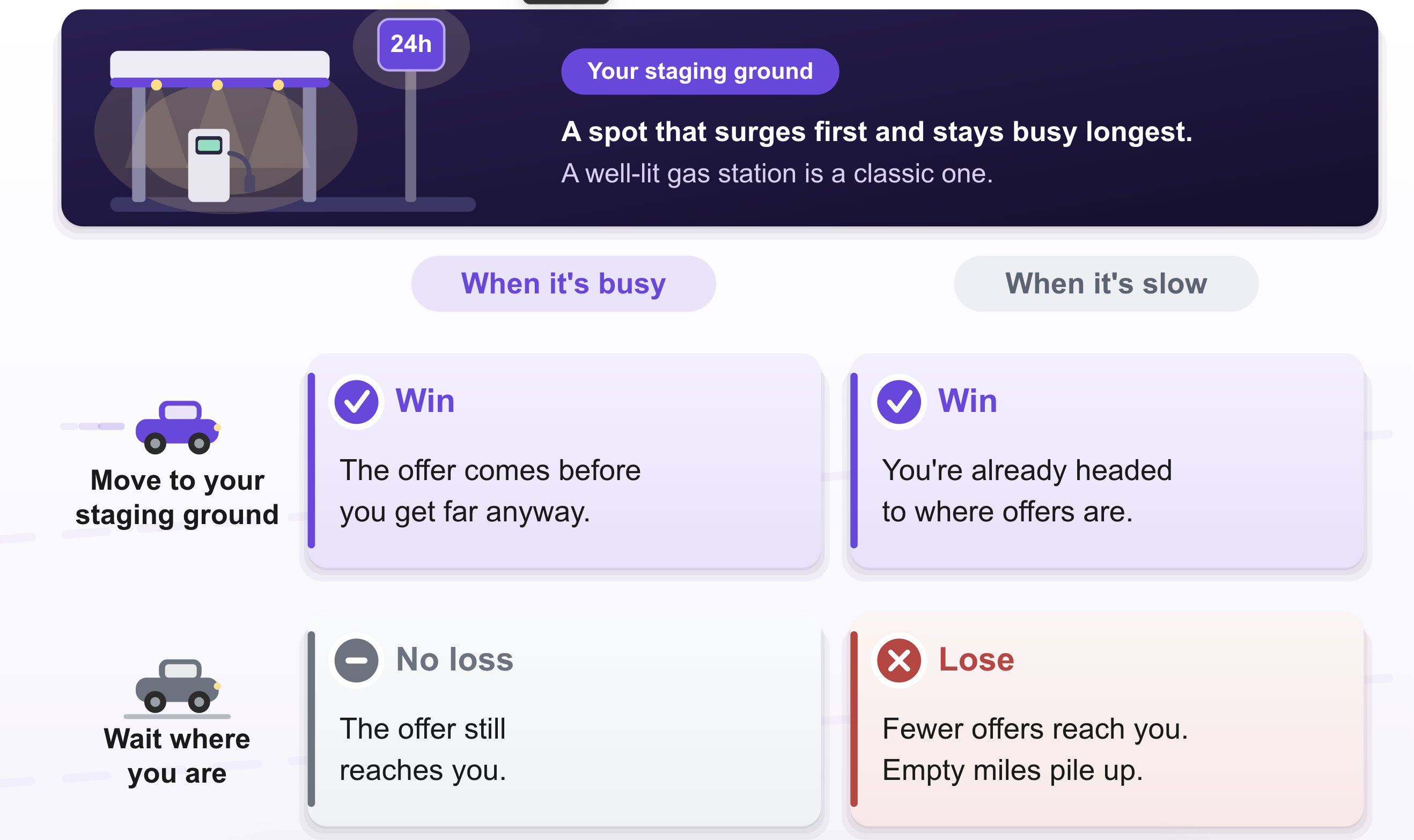
Next, I chose a "staging area." For me, this is a well-lit, comfortable gas station with security cameras, a 24-hour restroom, and food and snacks available. It's a place I feel safe idling at indefinitely. And most importantly, it is right in a zone that very frequently surges (at the times that I drive). This gas station is right outside the downtown area, so I don't have to move my tires at all to be in a surge, most of the time. Your market may let you have multiple staging areas, in which case you can just pick the closest one when you're out and about.
In fact, one key aspect of this staging area is even if there's no surge areas anywhere else, there's a surge here (or it's completely dead). It's the zone most likely to surge first and last zone for surges to fade away. That's what makes it ideal as a "staging area" or default position.
I bring my tablet with me and can read comics or watch videos while I wait, idling, for an offer to pass my filters on Mystro. Once one does, off I go. I can then break up driving time into three categories:
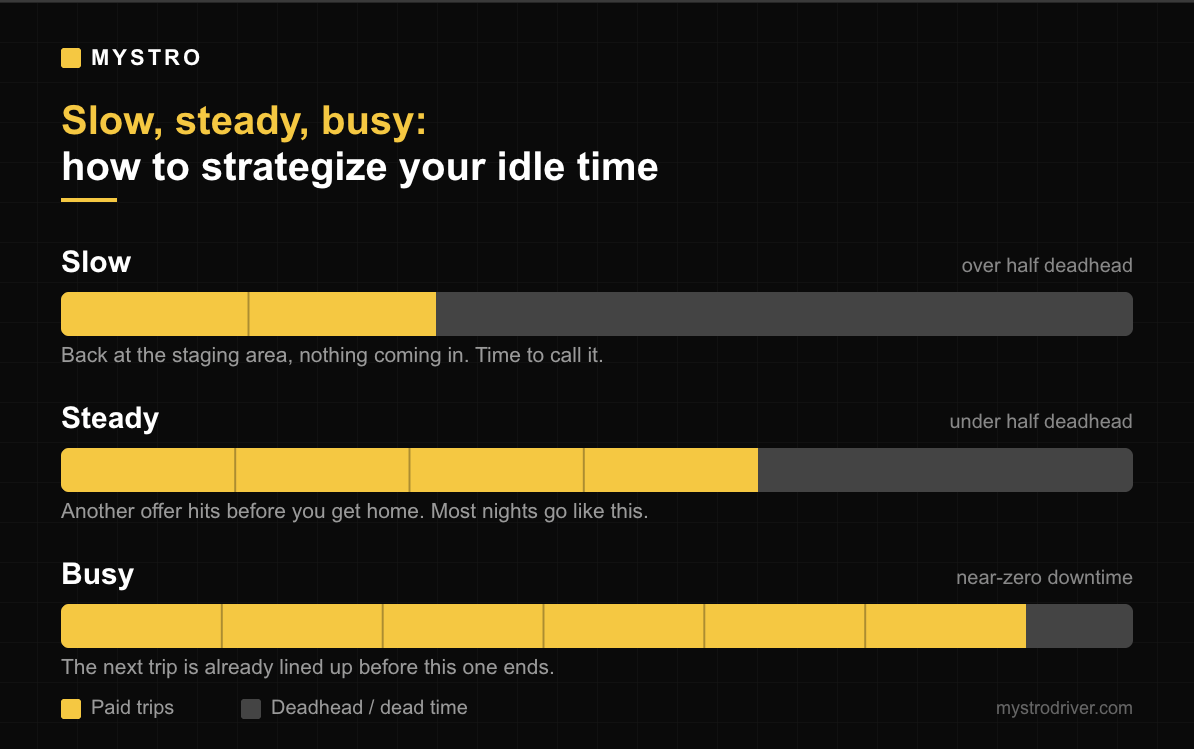
Slow: This is the sign that it just isn't worth driving right now. If I make it all the way back to the staging area after finishing a trip, and no offers come in on the way, I'll sit and read comics on my tablet or watch videos. The more time I sit waiting at the staging area, the bigger a sign that it's worth calling it. If deadhead time is more than half the time, then it's officially "slow." Your personal work/life balance will come into play to decide if you want to stick out and wait for it to get better or call it and go do something else. Either way, try to minimize the time you spend driving during dead time as every mile is cutting away from your profits.
Steady: This is the most common. I will do a trip, finish, and then immediately set my GPS to navigate back to my "staging area." However, before I can actually get there, another offer happens and I'm on another trip again. I call this "steady" and it's how most nights go. There's some deadhead driving back (especially if multiple trips have taken me far afield), but not a lot. Overall deadhead is less than half the time, on average.
Busy: This is the goal. With Mystro reviewing offers hands-free while I drive, I can filter for and accept the best cherry-picked offers even while I'm currently doing a ride, so the moment the current ride is done, there's already another one waiting for me. This means zero downtime and I'm making good earnings thanks to the cherry-picking. The only deadhead time is driving home when I'm done.
Avoid deadhead driving
Deadhead is the word for all the driving you do that you don't get paid for because you're not actively on a booked trip.
When things are "busy," you may do better with lower $/mi filters on a per-ride basis because you have less deadhead driving to account for. But when things are only "steady," or when they get truly "slow," then you're going to want to factor in all that deadhead driving back to your staging area and make sure the $/mi of the trip out into the dead area is worth the cost of the drive back from it to your staging area.
Be sure to use Mystro's Cost Per Mile calculator to get an idea of how much each mile costs you to drive. Then, when setting your filters in Mystro for $/mi, try to get a high enough profit that the CPM of your deadhead miles is covered, too.
If you have too much deadhead for realistic $/mi filters to cover, then it's time to go home and re-think your positioning or timing.
Quick tip summary
Okay, so that was a lot. Here's a breakdown of the main takeaways:
Use Mystro. A no-brainer. Hands-free filtering and multi-apping allow you to minimize dead time.
Learn your market, the when and the where. To get started, use the gig platform in-app guidance and contrast that with the free heatmaps Mystro provides. Find your best staging area(s) and focus around them, and master the art of predicting the surge.
Aim for "steady" or better. Call it when it gets too slow.
That's really it in a nutshell.
Got a dead-time move that works in your market? Reply and tell us, or drop it in the Discord. We read every one.
This post first appeared in The Mystro Newsletter — driver tips, earnings strategies, and Mystro updates, in your inbox every week.